QAD 2017 Enterprise Edition
>
User Guides
>
Master Data
>
Address Data
>
Setting Up Salesperson Addresses
Setting Up Salesperson Addresses
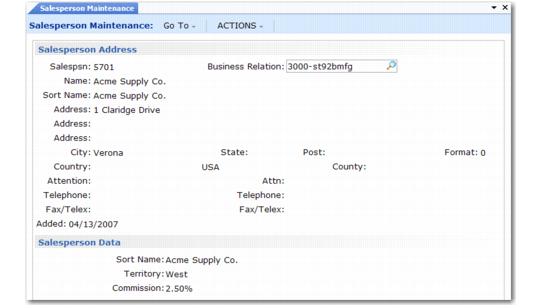
Use Salesperson Maintenance (2.5.1) to set up salesperson records. Associate the salesperson record with a business relation for address details. The salesperson record is linked to the headoffice type address in the business relation; the operational address record has the slsprsn address list type.
For each salesperson, specify a default commission percentage and a user-defined territory code. Enter detailed commission percentages for product lines and/or customers. Commission reports calculate amounts from net sales prices or gross margins (net price less standard cost) on posted invoices. Commissions are not reported from debit/credit memos.
Note: Use Sales Analysis functions to establish monthly quotas and generate quota reports. See
QAD Sales User Guide.
Salesperson Maintenance (2.5.1)
Set up salesperson before setting up customer records. Up to four default salesperson codes and commission percentages can be associated with each customer. These associations are used as defaults in Sales Quotations, Sales Orders/Invoices, Service/Support Management, and Accounts Receivable.
Use Salesperson Payments Report (2.5.16) to review paid invoices and unapplied payments, sorted by salesperson.