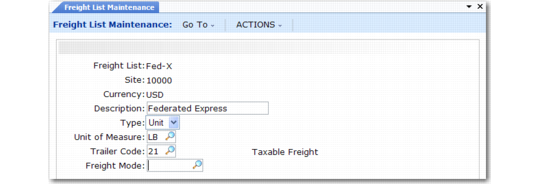
Freight List Maintenance
Use Freight List Maintenance (2.20.1) to define charges that apply to sales quotes, orders, and RMAs. Typically, you need at least one freight list for each shipping company you use. More than one freight list may be needed if the shipping company supports different types of transportation. For example, a shipping company may ship by train, by truck, by refrigerated truck, and by regular semi-trailer.
Freight List Maintenance (2.20.1)
Set up freight lists for different currencies if your shipper delivers to other countries. You can also define lists per site if the same shipper transports from more than one warehouse or manufacturing site.
Type
Specify whether freight charges are based on the weight of each unit or on the total weight of the items that use this freight list. Valid entries are:
• Unit: Freight charges are calculated for individual units based on each unit’s shipping weight.
• Bulk: Freight charges are calculated based on the total weight of applicable items. Weight is calculated for each order line as the unit weight multiplied by the line item quantity.
Trailer Code
This value links a freight list with the appropriate GL account to use when charging amounts on the sales quote, sales order, or pending invoice trailer.
Note: If the trailer codes you associate with freight lists are not the same as the default trailer codes in Sales Order Accounting Control, you must set Use SO Freight List Trailer Code to Yes in Sales Order Accounting Control. Otherwise, errors display and freight is not calculated in order maintenance programs.
Freight Mode
An optional code that can be used to describe the transportation method. Define values in Generalized Codes Maintenance for field fr_mode.