Freight Charges Maintenance
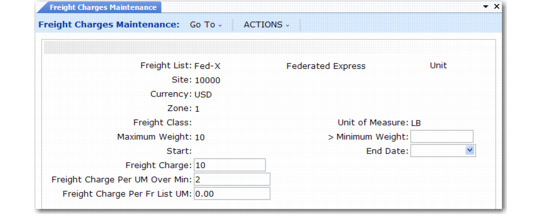
Use Freight Charges Maintenance (2.20.10) to relate a freight list, class, and zone, and to specify how charges are calculated. Use start and end dates to phase in new charges if fees rise or fall after a certain date.
Freight Charges Maintenance (2.20.10)
Maximum and Minimum Weight
Enter the highest and lowest weight that can be used with a freight charge. Set up weight boundaries to include all potential shipping weights.
Normally, the freight charges apply to the boundary weight. However, in two cases, this is not true.
• If you enter a minimum weight of 0 (zero), the freight calculation excludes the minimum boundary weight. Freight is never calculated if the actual shipping weight is 0.
• If you set up overlapping ranges so that the maximum of one range is the same as the minimum of the next range, the higher range takes priority. For example, if 1-5 pounds is charged $10 and 5-10 pounds is charged $15, $15 is applied to a weight of 5.
Freight Charge
Indicates a flat rate per shipment. The amount to be charged per order or per item as determined by the Type field in Freight List Maintenance.
Freight Charges Per UM Over Min
Indicates a surcharge over minimum. The freight charge per unit of measure over the minimum listed for this freight list in the Minimum Weight field. This is calculated per order or per item, based on the Type field in Freight List Maintenance.
Freight Charge Per Fr List UM
Indicates a weight-based fee. The freight charge for the unit of measure specified for the freight list in Freight List Maintenance.
Use any combination of these three types when defining freight charges. You can charge a flat rate plus a rate based on weight. Or you can charge a weight-based rate but with an additional charge for amounts over a certain minimum.