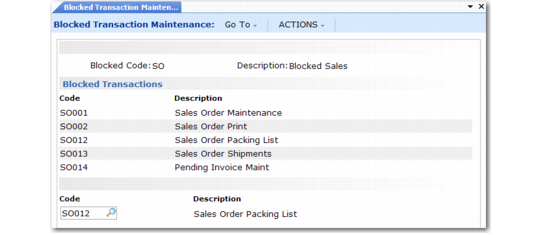
Defining Blocked Codes
Use Blocked Transaction Maintenance (2.23.1) to build one or more sets of blocked transactions and identify each set by a blocked code.
You can add blocked codes or modify them. You can also delete them provided they have not been assigned to a customer or supplier.
Note: To delete a blocked code, first position the cursor in the Description field.
Choose transactions to block from the predefined set loaded with the system.
After defining blocked codes, associate them with customers in Blocked Customer Maintenance (2.23.4) and suppliers in Blocked Supplier Maintenance (2.23.7).
When a customer has been assigned a blocked code, all end users of that customer in SSM are automatically blocked from the same transactions.
Blocked Transaction Maintenance (2.23.1)
Blocked Code
Specify a code (maximum 8 characters) to identify a set of blocked transactions that can be assigned to a selected customer or supplier.
Description
Enter a brief (24-character maximum) description of the blocked transaction code.
Code
Select the transaction code that identifies a program to be associated with this blocked code from the predefined list. The system displays the program description next to the code.
Blocked Transaction Report (2.23.2) lists the blocked codes defined in Blocked Transaction Maintenance and provides details of the blocked transactions associated with each blocked code. You can display the blocked transactions for a single blocked code or for a range of blocked codes.