Trade Zones and Trade Environments
Logistics transactions involve trade zones, or regional areas with differing rates and requirements for shipping and receiving. A trade environment is the combination between two trade zones. A trade environment is defined to help users apply multiple rates that a specific logistics supplier for a specific logistics charge would apply, depending on the distance and method of a delivery.
In logistics accounting, specify trade environments and trade classes to help manage different costs on a zone-by-zone basis.
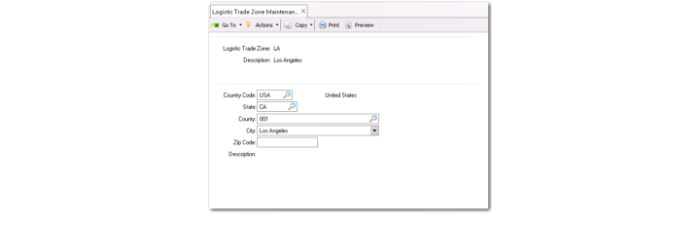
Create new trade zones in Logistic Trade Zone Maintenance (2.15.9.1).
Logistic Trade Zone Maintenance (2.15.9.1)
Logistic Trade Zone
Enter a name for the trade zone.
Description
Enter a description.
Country Code
Enter a country code for the country in which the trade zone is located.
State
Enter the state in which the trade zone is located.
County
Enter the county in which the trade zone is located.
City
Enter the city in which the trade zone is located.
Zip Code
Enter the zip code in which the trade zone is located.
Description
Enter any additional information.
Trade environments are used to manage specific trade zones and their relationships to each other. They address the needs of logistics suppliers who are calculating costs based not only on weight or volume, but on distance. For example, a shipment within one city will cost a different amount than a shipment from the city to another city, another state, or another country. By combining data from ship-to and ship-from trade zones, trade environments can be created for frequently used routes and can help predict costs more efficiently.
Create new trade environments in Trade Environment Maintenance (2.15.9.4). Specify ship-to and ship-from zones in the appropriate fields. Access existing trade environments in Trade Environment Browse (2.15.9.5).
Trade Environment Maintenance (2.15.9.4)
Trade Classes
Trade classes enable you to exclude or include items in the total charge calculation for a purchase order or purchase order shipper. A trade class enables you to group items that have the same taxable basis so that they are valued at the same rate during the apportioning process.
Trade classes are useful when not all items require a specific logistics charge. For example, not all goods imported from one country to another require custom clearance. Therefore, not all goods require customs handling fee processing during the import calculation.
In cases such as these, you can define a trade class—for example, DUTY—in the logistics charge code definition to apply to all items that require custom clearance fees to be applied. When calculating the logistics charge, only those items that match the trade class as defined in the logistics charge maintenance are considered for the total charge calculation.
Create new trade classes in Trade Class Maintenance (2.15.9.7). Trade classes can be assigned to specific items in Item Master Maintenance (1.4.1).
Note: Trade classes enable you to exclude or include items in one of the existing apportioning methods. However, you cannot use trade classes to define logistics charge price lists by item code or a group of items.
Trade Class Maintenance (2.15.9.7)