Scrap
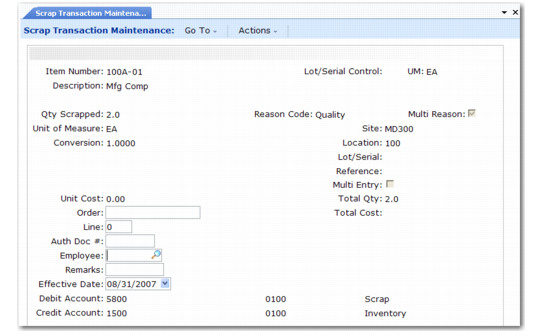
Use Scrap Transaction Maintenance (3.14) to record removing one or more items from inventory as scrap.
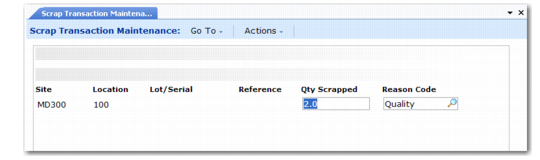
Set Multi Reason to Yes, when the quantity is greater than one, to use multiple scrap reason codes. The system displays the Scrap pop-up screen where you can specify which reason code to use for each portion of the total quantity. The system creates an inventory transaction history record for the quantity assigned to each reason code. When multiple lines in the Scrap screen have the same reason code, the quantities on these lines are summed into one transaction record. The transaction type is ISS-SCRP.
Set Multi Entry to Yes when the quantity is greater than one to assign quantities and reason codes by site, location, and lot/serial.
Note: Define reason codes in Reason Codes Maintenance (36.2.17) with the Reason Type set to Scrap.
Scrap transactions debit Inventory accounts and credit Scrap accounts. With field security set, only those who are authorized can update the account fields.
• The Credit Account is the Scrap account defined in Inventory Account Maintenance (1.2.13) for the product line and site or the Scrap account defined for the product line in Product Line Maintenance (1.2.1).
• The Debit Account is the Inventory account defined in Inventory Account Maintenance for the product line and site or the Inventory account defined for the product line in Product Line Maintenance.
Scrap Transaction Maintenance is not appropriate for components that are lost or unusable as a result of the manufacturing process. For work orders use Work Order Receipt (16.11), Work Order Receipt Backflush (16.12), or Work Order Operation Backflush (16.19). For repetitive manufacturing, use Backflush Transaction (18.22.13) or Repetitive Scrap Transaction (18.18).
Reason Code
Enter a reason code to use for a scrap transaction.
When Multi Reason is No, the reason code applies to the quantity in Qty Scrapped.
When Multi Reason is Yes and Multi Entry is No, the system displays the Scrap pop-up screen with this reason code applied to the Qty Scrapped on the first line; you can split the quantity into as many as ten portions and apply different reason codes to the portions.
When Multi Entry is Yes, the system displays the Item Detail screen for specifying reason codes for portions of Qty Scrapped by site, location, and project.
Each quantity and reason code combination creates a unique Transaction History record. When the same reason code is used on multiple lines in the Scrap screen, the quantities on those lines are summed to create one Transaction History record with that reason code.
Reason codes are validated against codes set up in Reason Codes Maintenance with Reason Type set to Scrap. This field can be left blank only if a blank reason code is set up for the field in Reason Codes Maintenance.
Some reports and inquiries can be selected by reason code.
Multi Reason
Set this field to Yes to display the Scrap pop-up window for applying different reason codes to portions of the total quantity to be scrapped. The default is No.
Each quantity and reason code combination creates a unique Transaction History record. When the same reason code is used on multiple lines in the pop-up, the quantities on those lines are summed to create one Transaction History record with that reason code.
Auth Doc #
Enter the ID number for the document that authorizes the transaction. Some reports and inquiries can be selected by document ID number.
Employee
Enter the employee code of the person creating this inventory transaction. Define employees in Employee Create.
This screen displays when Multi Reason is set to Yes.
Use these fields in the Scrap detail screen.
Quantity Scrapped
Enter the quantity of the item to be scrapped with a particular scrap reason code.
Multiple reason codes can be used when the total quantity to be scrapped is greater than one, If the same reason code is used for multiple partial quantities, those quantities are summed into one transaction. The sum of the partial quantities must equal Qty Scrapped.
Reason Code
Enter the scrap transaction reason code for part of the total quantity to be scrapped.
Multiple reason codes can be used when the total quantity to be scrapped is greater than one. If the same reason code is used for multiple partial quantities, those quantities are summed into one transaction. The sum of the partial quantities must equal Qty Scrapped.