Deleting/Archiving Consumption Data
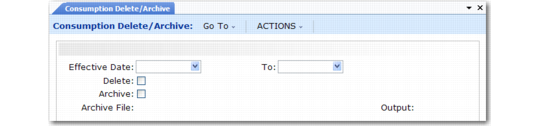
Use Consumption Delete/Archive (3.5.1.20) to delete or archive selected consumption data. You must set Delete to Yes to archive data.
If you optionally archive the consumption data by setting Archive to Yes, the system displays the archive file name it creates in Archive File. The system informs you to back up the archive file to disk.
Consumption Delete/Archive (3.5.1.20)
Effective Date
Enter the first transaction date in a range of dates to be archived or deleted. The system converts this date to a GL period according to the GL calendar. A blank means the system deletes or archives all consumption data up to the date you specify in the To field.
Enter the last transaction date in a range of dates in the To field. A blank means the system deletes or archives all consumption data from the date you specify in Effective Date. If this field and the To field are blank, the system deletes or archives all consumption data.
Delete
Indicate if you want to delete consumption data.
No (the default): The system does not delete consumption data.
Yes: The system deletes consumption data on the dates you specify and lets you archive data.
Archive
Indicate if you want to archive consumption data. You must set Delete to Yes to archive data.
No (the default): The system does not create an archive file of consumption data.
Yes: The system creates an archive file. Archive File displays the archive file name the system creates. The system informs you to back up the archive file to disk.