QAD 2017 Enterprise Edition
>
User Guides
>
Master Data
>
Address Data
>
Setting Up Country Code Data
Setting Up Country Code Data
Records for tax zones, addresses, delivery transit time codes, and users reference alphanumeric country codes defined using the Country Code functions (36.1.3.1.1) on the Corporate Structure Setup Menu; this is the only place where the codes can be created or deleted.
Set up additional operational data in Country Code Data Maintenance (2.14.1). To verify data setup, use Country Code Browse (2.14.2) and Report (2.14.3).
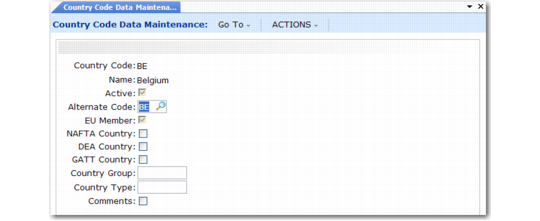
Country Code Data Maintenance (2.14.1)
Country Code
Select a previously defined country code to update. The country name, active status, and EU Member field display data defined for the country. The name displays on printed addresses.
Active
This read-only field indicates whether the country code is active.
Alternate Code
Optionally, enter an alternate code for:
• Sorting in Country Code Browse
• The International Organization for Standards (ISO) country code
Important: If the country will be associated with users, you must specify the ISO code here.
Each user must be associated with a country code in User Maintenance (36.3.1). That country code maps to the alternate code you enter here. If you do not have an alternate country code specified here, the system displays an error message in User Maintenance (36.3.1).
ISO country codes must be defined in Generalized Codes Maintenance. If you enter an alternate code that is used for another country, the system displays a warning message.
The ISO country code helps determine the locale for the user. The system uses the ISO code to set up date and number formats and other interface elements for each user session.
EU Member
This read-only field indicates whether the country is identified as a member country of the European Union (EU) when the code is defined in Country Create. This information determines whether an inventory transaction relates to an intra-EU inventory movement that should be included in Intrastat reporting. This field is not used for GTM.
Comments
Enter Yes to display a screen for recording special requirements, restrictions, or other GTM specifications.
The following fields are only available when Compliance Active is Yes in Regulatory Attributes Control (1.22.24). See
Managing Controlled Substances.
NAFTA Country
Reference only. Identifies member countries of the North American Free Trade Agreement.
DEA Country
Reference only. Identifies countries under the jurisdiction of the United States Drug Enforcement Administration.
GATT Country
Reference only. Identifies countries as members of the General Agreement on Tariffs and Trade.
Country Group
Use this field to categorize countries. Use letter codes such as those assigned by current Export Administration Regulations.
Country Type
Reference only. Use this field to categorize countries. Use letter codes such as those assigned by current Export Administration Regulations.