QAD 2017 Enterprise Edition
>
User Guides
>
Master Data
>
Address Data
>
Setting Up Delivery Transit Times
Setting Up Delivery Transit Times
Use Delivery Transit Time Maintenance (2.16.1) to enter standard transit time data for inventory deliveries between a site and the specified country, state, and city. You can specify whether the transit time applies to shipments from the site to an address, from an address to the site, or is the same in both directions. For example, it may take longer to transport goods from a supplier address to your site because items may have to clear customs on the way. The system uses delivery transit times in some automatic date calculations.
For example, when Calculate Promise Date is Yes in Sales Order Control (7.1.24), the system checks the ship-from site and the delivery destination to determine the transit time. It uses the specified number of days along with date information on the order to calculate promise dates or due dates.
See
QAD Sales User Guide for information on date calculations.
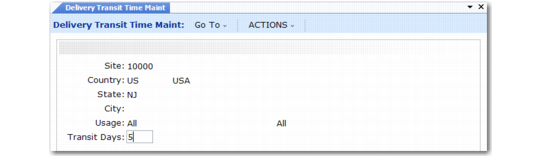
Delivery Transit Time Maintenance (2.16.1)
Site
Enter the code representing a site from which inventory is shipped or to which inventory is delivered. This field cannot be blank and the site must already be defined in Site Maintenance (1.1.13).
Country
Enter the code representing the country from which inventory is shipped or to which inventory is delivered. You can leave this field blank or enter a valid, active code.
State
Enter a valid, active code identifying the state from which inventory is shipped or to which inventory is delivered. You can leave this field blank.
City
Enter the city from which inventory is shipped or to which inventory is to be delivered. You can leave this field blank. Values are not validated.
Usage
Specify the usage for this transit time.
Inbound: Transit Days represents the number of calendar days to transport goods from an address to the specified site.
Outbound: Transit Days represents the number of days to transport goods from the specified site to an address.
All: Transit Days is the same for transportation into and out of the specified site.
Transit Days
Enter the number of calendar days to transfer inventory between the inventory site and the location defined by the specified combination of country, state, and city. The system adds this number to the due date on a sales order to calculate the promise date automatically. You must enter a non-zero, positive integer.
Note: By leaving Country, State, and City blank, you can create a generic default transit time that calculates a promise date for any unspecified delivery location.