Setting Up the Control Programs
Logistics Accounting Control
Use Logistics Accounting Control (2.15.24) to:
• Activate the Logistics Accounting module.
• Assign NRM sequence codes to sales order and distribution order shipments.
• Specify apportion methods and units of measure.
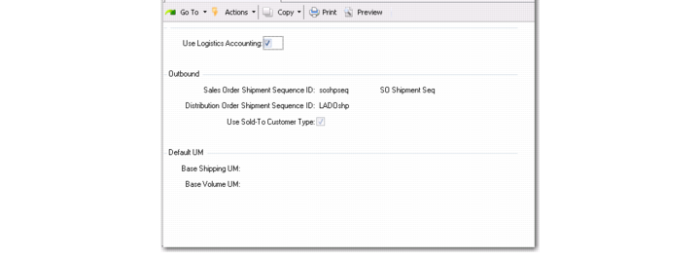
Logistics Accounting Control (2.15.24)
Use Logistics Accounting
Enter Yes to enable the functionality in the Logistics Accounting module. When you enable Logistics Accounting, additional logistics accounting fields are activated in other modules.
Sales Order Shipment Sequence ID
Enter the NRM sequence code used for sales order shipments. The sequence code must have the target dataset la_so_ship_id.
Distribution Order Shipment Sequence ID
Enter the NRM sequence code used for distribution order shipments. The sequence code must have the target data set la_do_ship_id.
Use Sold-to Customer Type
Specify whether or not to use the sold-to customer type.
Base Shipping UM
Specify a unit of measure by weight.
Base Volume UM
Specify a unit of measure by volume.
Note: Base, or default, shipping and volume UM are defined in case apportion methods 2 or 3. They are used to define the base UM when multiple UMs are used for multiple items.
Logistics Operational Accounting Control
Use Logistics Operational Accounting Control (36.9.1) to:
• Specify whether pending invoices must contain a third-party logistics supplier before they can be selected for receiver matching.
• Specify default GL accrual, expense, and variance accounts for tracking inbound and outbound logistics charges. You can define a separate set of default outbound accounts for sales order and distribution order shipments.
If you only want to track inbound logistics charges, you can leave the Outbound fields blank. If you only want to track outbound logistics charges, you must first define inbound accounts when Verify GL Accounts is Yes in Domain/Account Control.
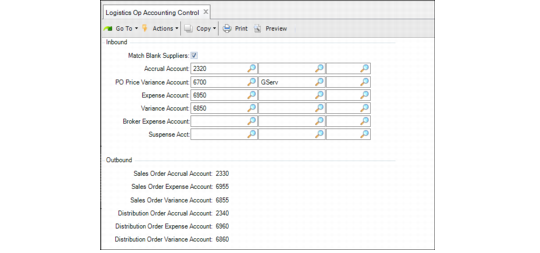
Logistics Operational Accounting Control (36.9.1)
The accounts defined in Logistics Operational Accounting Control are used as the defaults when you create a logistics charge code in Logistics Charge Code Maintenance (2.15.1). Since these are default accounts, none of the static data or transactions that reference them are changed when these accounts are modified in Logistics Operational Accounting Control.
Match Blank Suppliers
When No, only pending invoices with a defined logistics supplier display when logistics charges are selected for matching in the Logistic Charge tab of Receiver Matching Create (28.2.1). The default is No.
When set to Yes, you can indicate during receiver matching whether to display pending invoices with blank suppliers using the Include Blank Suppliers field in the Logistic Charge tab of Receiver Matching Create.
See
QAD Financials User Guide for more information on receiver matching.
Accrual Account, Expense Account, Variance Account, Suspense Account Broker Expense Account
Enter the accounts, sub-accounts, and cost centers used to track inbound logistics charge accruals, expenses, and variances.
These accounts provide the defaults in Logistics Charge Code Maintenance (2.15.1).
Sales Order Accrual Account, Expense Account, Variance Account
Enter the accounts, sub-accounts, and cost centers used to track outbound logistics charge accruals, expenses, and variances associated with sales order and RMA shipments.
Distribution Order Accrual Account, Expense Account, Variance Account
Enter the accounts, sub-accounts, and cost centers used to track outbound logistics charge accruals, expenses, and variances associated with distribution order shipments.
The sales order and distribution order accounts provide the defaults in Logistics Charge Code Maintenance (2.15.1).