Work Center Rates
You use programs in the Periodic Costing Work Center Rate Menu (30.5.3) to set up the rates. You can set up and maintain the work center rates, copy them, upload the rates, and run a report and inquiry, using the following:
• PC Work Center Rate Inquiry (30.5.3.2)
• PC Work Center Rate Report (30.5.3.3)
• PC Work Center Rate Copy (30.5.3.5)
• PC Work Center Rate Update (30.5.3.13)
Set Up and Maintain Rates
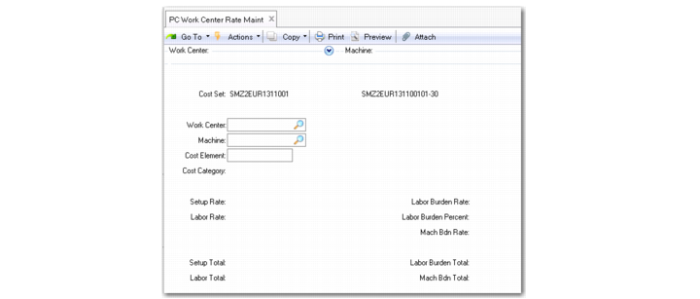
Use PC Work Center Rate Maintenance (30.5.3.1) to define setup and labor rates, as well as labor burden and machine burden rates, used in Periodic Costing calculations for a specified cost set.
To maintain the work center rates manually:
1 Open PC Work Center Rate Maintenance.
2 Leave the Import/Export File option cleared and click Next.
3 Select your desired cost set and define the field values.
You can maintain the following rates or totals by specified work center, machine, and element:
• Labor burden percent
• Labor burden rate/total
• Labor rate/total
• Machine burden rate/total
• Setup rate/total
If you leave the machine field blank, all operations with a blank Machine field use the rate.
When you provide work center rates as totals, the formulas to calculate production costs rates are as follows:
Total run time = accumulated total run time for the department/work center/machine
Total setup time = accumulated total setup time for the department/work center/machine
Labor Rate = (total labor cost / total run time)
Setup Rate = (total setup cost / total setup time)
Burden Rate = (total labor burden cost / (total run time + total setup time))
Machine Burden Rate = (total machine burden cost / (total run time + total setup time))
PC Work Center Rate Maintenance (30.5.3.1)
Cost Set
Enter the cost set for which you want to maintain work center rate costs.
Copy Rates
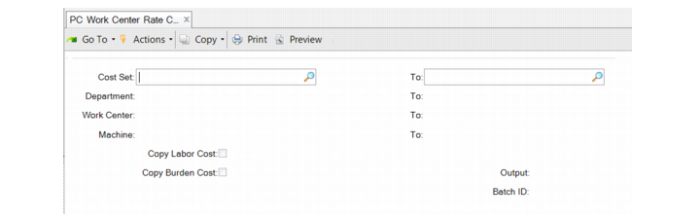
Use PC Work Center Rate Copy (30.5.3.5) to copy rates. You can enter a range of cost sets, departments, work centers or machines; then, specify Yes to copy labor or burden costs.
PC Work Center Rate Copy (30.5.3.5)
Update Rates
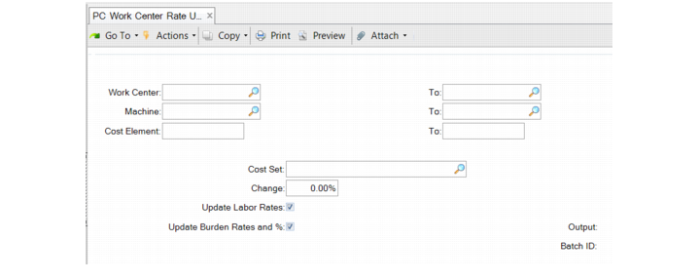
Use PC Work Center Rate Update (30.5.3.13) to update the labor rates and burden rates that you established in PC Work Center Rate Maintenance by a percentage change.
Specify a range of work centers, machines, and cost elements (labor, burden, and so on), then specify the cost set. Enter a percentage by which you want the rates updated. For example, if you want to increase rates by 10%, enter 10. Specify whether the percentage is applied to labor rates or to burden rates.
PC Work Center Rate Update (30.5.3.13)