PC Operations Reports
You can use the reports in the PC Operations Reports menu (30.5.15) to help you review operations data.
• PC Work Order WIP Cost Report (30.5.15.1)
• PC WO WIP History Report (30.5.15.2)
• PC WO WIP History Inquiry (30.5.15.6)
• PC WO Bill Cost (30.5.15.7)
• PC WO Routing Cost Browse (30.5.15.8)
• PC WO Cost History Report (30.5.15.12)
• Operational Trans Detail Inquiry (30.5.15.13)
• Op Operational GL Transactions (30.5.15.14)
• Operational Inv Transactions (30.5.15.24)
• WO Receipts (30.5.15.25)
• WO Components (30.5.15.26)
• Operation Transaction (30.5.15.27)
• Subcontract Receipts (30.5.15.28)
• PC Cost Detail (30.5.15.29)
The following topics describe important reports and inquiries most frequently used in reconciling PC operations.
PC Work Order WIP Cost Report
Use PC Work Order WIP Cost Report (30.5.15.1) to specify a range of data to display for each cost set. You can specify the account, sub-account, cost center, project, work order, ID, item number, site, sales/job, or supplier.
PC WO WIP History Report
Use PC WO WIP History Report (30.5.15.2) to display work order WIP history for each cost set. You can specify a range of work orders, sites, item numbers, batches, due dates, IDs, sales/jobs, or suppliers. Optionally, you can specify whether to display items, routing details, and co-/by-product orders. You can also select a cumulative order with no effective date or set page breaks on work orders that display.
PC WO Routing Cost Browse
PC WO Routing Cost Browse (30.5.15.8) displays Periodic Costing work order routing cost for multiple periods. For any cost set, when the WO has any operation or finished goods transactions that affect WIP, the browse displays all WO routing of this WO of this cost set.
PC WO WIP History Inquiry
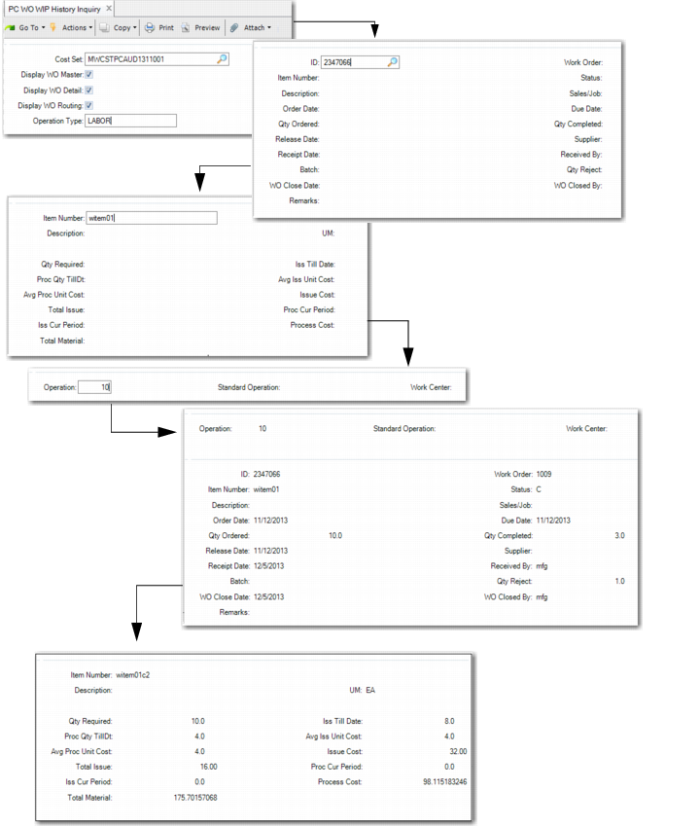
Use PC WO WIP History Inquiry (30.5.15.6) to view WO WIP history data for components and routing operations. You can specify the cost set and operation type, which are mandatory fields; then specify whether the WO master, WO detail, or WO routing data displays in the report. When you press Go, you are prompted to enter additional information such as operation and component item data. Enter specifics about each area, then press Go to run the inquiry.
PC WO WIP History Inquiry (30.5.15.6)
PC WO Cost History Report
Use PC WO Cost History Report (30.5.15.12) to review work order cost data. You enter the work order; the system defaults the ID, item number, release and due dates, quantity ordered and completed, status, sales/job, and supplier. You can optionally choose to print BOM or routing detail or print co-/by-product orders. You can also choose to insert page breaks upon cost sets to aid when printing. The system defaults the currency to print, but you can change it.
The report displays the work order data in the header, including receipt, order, release, WO close, and due dates; quantity ordered, completed, and rejected; status, supplier, job, and other data. For each cost set, it displays the UM, quantity required, issue till date, and issue for the current period, then the average issue unit cost, total material issue cost, process to date/process current period, the average process unit cost, and the total issue process cost.
It displays the operation ID, standard operation, work center; the process quantity and the total hours till date and for this period; and the operation cost per unit and total operation cost.
Operation Trans Detail Inquiry
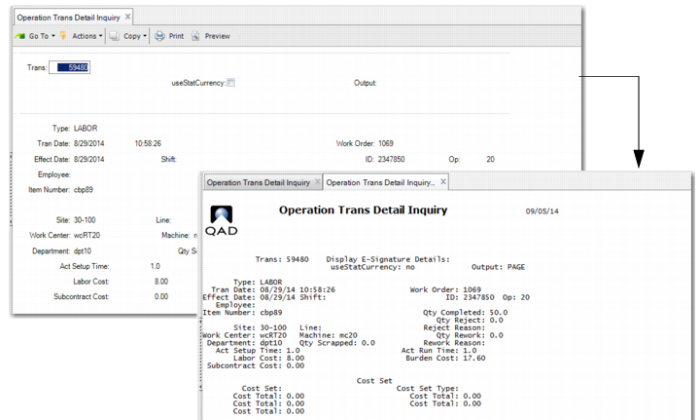
Use Operation Trans Detail Inquiry (30.5.15.13) report to view operational transaction details. You first enter the transaction number, then use the initial frame to view transaction details in the QAD EA standard maintenance frame setup. When you press Next, the system displays the report data.
Operation Trans Detail Inquiry (30.5.15.13)
Op Operational GL Transactions (30.5.15.14)
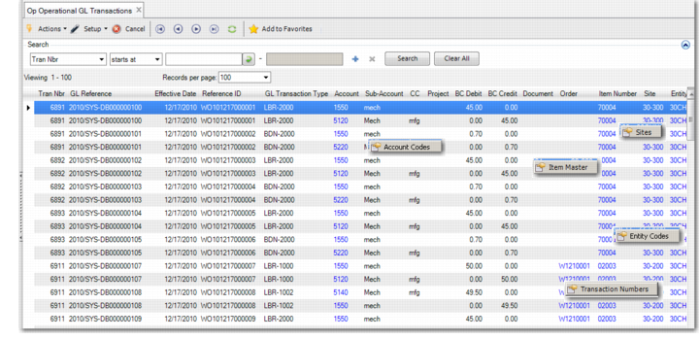
Use Op Operational GL Transactions (30.5.15.14) to view GL transaction data, including the transaction number, GL reference, effective date, reference ID, GL transaction type, account, sub-account, cost center, project, BC debit and credit, documents, orders, item number, site, entity, ID, and operation.
Several columns display a button when you right-click on the column. When you click the button, a supporting browse displays. Columns with additional data include:
Column | Button/Supporting Tab |
Account | Account Codes |
Order | Transaction Number |
Item | Item Master |
Site | Sites |
Entity | Entity Codes |
Op Operational GL Transactions (30.5.15.14)
Operational Inv Transactions (30.5.15.24)
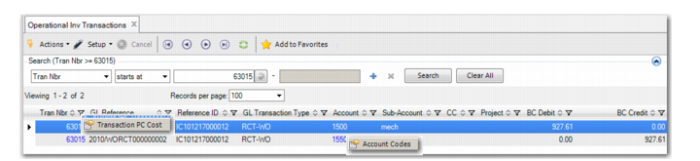
Use Operation Inv Transactions (30.5.15.24) to view inventory operational transactions. You can view the transaction number, GL reference and reference ID, GL transaction type, account and sub-account, cost center, project, BC debit and credit, and more. Columns with additional data include:
Column | Button/Supporting Tab |
Tran Nbr | Transaction PC Cost |
Account | Account Code |
Operational Inv Transactions (30.5.15.24)
WO Receipts and WO Components
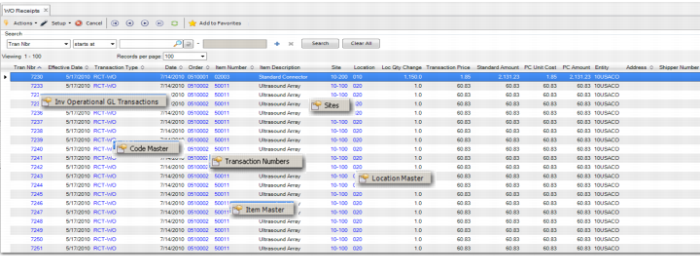
Use the WO Receipts (30.5.15.25) to report WO receipt data, including the transaction number, effective date, transaction type, date, order, item number and description, site, location, location quantity change, transaction price, standard amount, Periodic Costing unit cost and amount, entity, address, and cost set.
Use WO Components (30.5.15.26) to report similar data to the WO Receipts report. Columns with additional data include:
Column | Button/Supporting Tab |
Tran Nbr | Inv Operational GL Transactions |
Transaction Type | Code Master |
Order | Transaction Numbers |
Item Number | Item Master |
Site | Sites |
Location | Location Master |
WO Receipts (30.5.15.25)
Operation Transaction
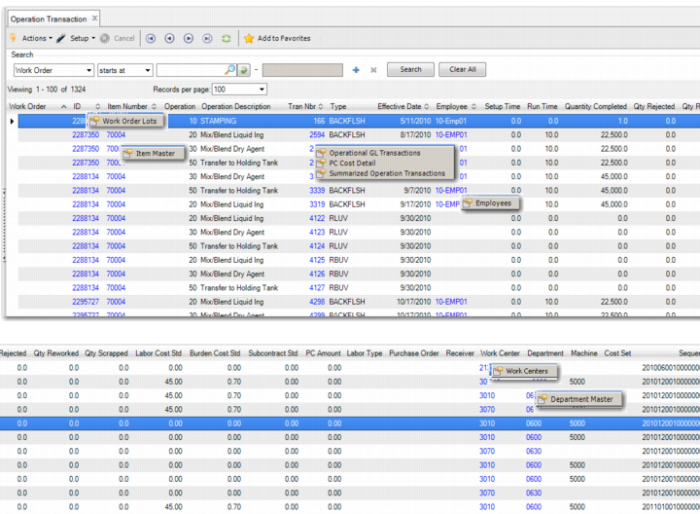
Use Operation Transaction (30.5.15.27) to view transaction data, including the WO number and ID; item number; operation number and description; transaction number and type; effective date; employee; setup and run time; quantity completed, rejected, reworked, and scrapped; labor and burden cost standard; Periodic Costing amount; labor type; PO and receiver number; work center, department, and machine; and sequence number. Columns with additional data include:
Column | Button/Supporting Tab |
ID | Work Order Lots |
Item Number | Item Master |
Order | Transaction Numbers |
Item Number | Item Master |
Tran Nbr | Operational GL Transactions PC Cost Detail Summarized Operation Transactions |
Employee | Employees |
Work Ctr | Work Centers |
Department | Department Master |
Operation Transaction (30.5.15.27)
Subcontract Receipts
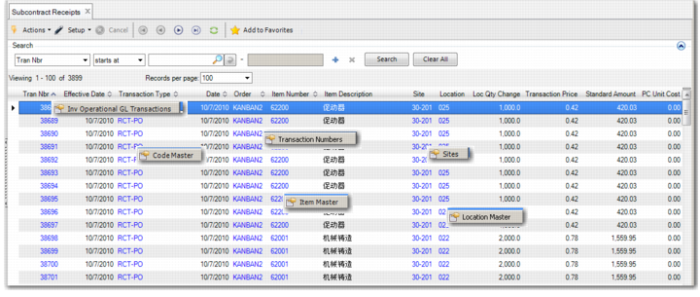
Use Subcontract Receipts (30.5.15.28) to view subcontract receipt data, including the transaction number, effective date, transaction type, date, order, item number and description, site, location, location quantity change, transaction price, standard amount, Periodic Costing unit cost and amount, entity, address, shipper number, operation ID, and flag. The Flag field indicates when the RCT-PO transaction is for a subcontract PO and there is a related SUBCNT operation transaction in the operation history. Columns with additional data include:
Column | Button/Supporting Tab |
Tran Nbr | Inv Operational GL Transactions |
Transaction Type | Code Master |
Order | Transaction Numbers |
Item Number | Item Master |
Site | Sites |
Location | Location Master |
Subcontract Receipts (30.5.15.28)
PC Cost Detail
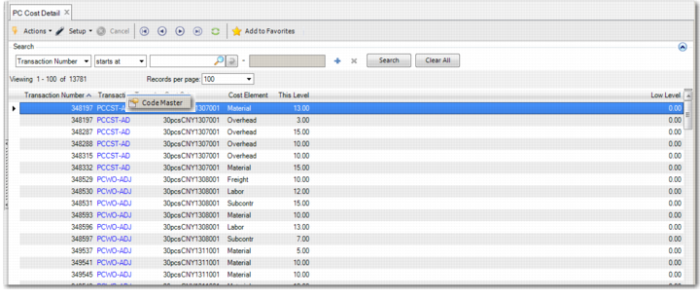
Use PC Cost Detail (30.5.15.29) to view Periodic Costing details, including the transaction number and type, cost set and cost element, and level data. The report supports six transaction types:
• Unit cost adjustment (PCCST-AD)
• Total cost adjustment (PCTOT-AD)
• WO component cost adjustment (PCWO-ADJ)
• WO labor and burden cost adjustment (PCWOP-AD)
• Unit cost calculation correction (PCCSTCOR)
• Unit cost calculation details (PCCSTCAL)
For PCCST-AD, the two level-related columns indicate the current-level and lower-level cost after you make adjustments through PC Unit Cost Adjustment. For PCTOT-AD, PCWO-ADJ, and PCWOP-AD; the two level-related columns indicate the cost delta between the before and after adjustment after you run PC Total Cost Adjustment. For PCCSTCAL, the two level-related columns indicate the current-level and lower-level cost of the item-site. For PCCSTCOR, the two columns indicate the cost before a unit cost reset.
Columns with additional data include:
Column | Button/Supporting Tab |
Transaction Type | Code Master |
PC Cost Detail (30.5.15.29)