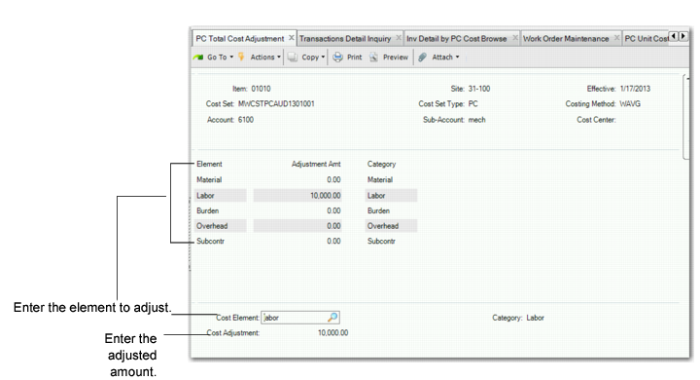
Total Cost Adjustment
Use PC Total Cost Adjustment (30.5.5.2) to create a total cost adjustment to periodic cost. A total cost adjustment is, typically, performed to affect the inventory value for transactions that are not considered by the Periodic Costing calculation. Some cost is missing (for example, logistics costs) or exceeds the expected cost (for example, recoverable taxes are in the inventory) and, for this reason, you decide to make some adjustments.The total cost adjustment can be positive or negative and can be done for any cost element.
You can specify the period/year for the total cost adjustment.
When statutory currency is enabled for the domain, the system calculates the total cost adjustment transaction in statutory currency based on the effective date provided.
The system creates the PCTOT-AD inventory transaction history record and a periodic cost adjustment GL transaction for the total cost adjustment. You should specify an adjustment account for this total cost adjustment transaction. The total cost adjustment transaction impacts the item inventory account and the adjustment account specified.
The system verifies that there is inventory value available to absorb a negative adjustment. When the full amount cannot be absorbed, the system creates the PCTOT-COR GL transaction to post the amount that cannot be absorbed to the discrepancy account.
Navigation
Enter the item number, site, and effective date for the unit. The system displays the Cost Set Selection frame. Select the cost set, then enter the account, sub-account, and cost center. The system displays elements from the cost set.
Individually adjust costs in the Adjustment Amt field for any cost element. You can enter a negative amount for an element; however, the total should be positive. The system sums the total cost adjustment for the period, and compares the adjustment against receipts on the element level.
The system creates a periodic cost adjustment GL transaction for the total cost adjustment. An adjustment account for this total cost adjustment transaction should be specified. The total cost adjustment transaction impacts the specified inventory account and the adjustment account specified.
PC Total Cost Adjustment (30.5.5.2)
Item Number
Enter the item number for which you want to adjust cost elements.
Site
Enter the site for the item.
Effective Date
Enter the effective date for the cost adjustment.
Account
Enter the account for the adjustment.
Sub-Account
Enter the sub-account for the adjustment.
Cost Center
Enter the cost center for the adjustment.
Adjustment AMT
Accept or enter a new amount in dollars and cents for the element.
View Updated Unit Cost and Historical Unit Cost
You can view the following after you perform a PC total cost adjustment to find the adjustment transactions:
• Inventory and SF Movement Report (mod3) displays the adjustment transactions.
• Transaction PC Cost Browse Collection to see the details of the Total Cost Adjustment transaction by cost element.