PC Reverse Calculation Flow
The following flow diagrams illustrate the logic flow of PC Calculation Reverse:
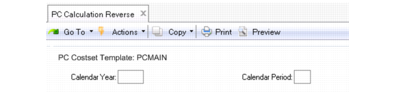
The system first obtains the input year and period from the user:
PC Calculation Reverse Flow, Step 1
Next, the system uses the Financials API to reverse the Periodic Costing postings and to capture GL references that were used:
PC Reverse Flow, Step 2
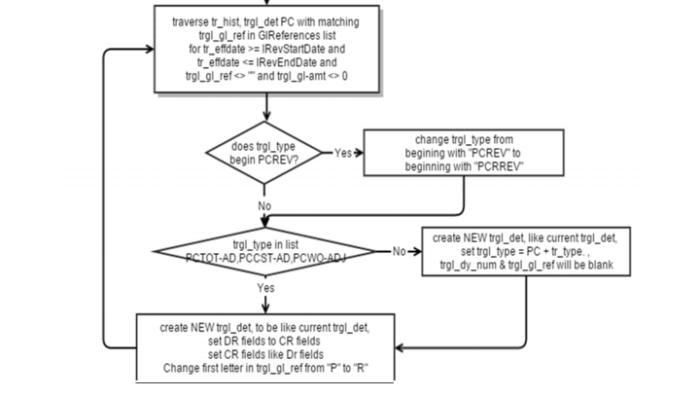
Next, the system reverses the tr_hist/trgl_det related data, filtering by period for the effective range and GL references captured from the Financials API:
PC Reverse Flow, Step 3
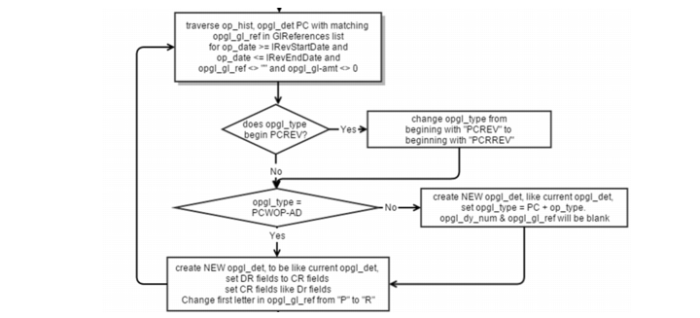
Next, the system reverses the Op_hist/Opgl_det related data, filtering by period effective range and GL References captured from the Financials API:
PC Reverse Flow, Step 4
For the final step, the system resets the PC cost adjustment data:
PC Reverse Flow, Step 5
The following figure depicts a reopened month end close and reversed Periodic Costing calculations.
Reopen Month-End Close and PC Calculation Reversal
Running PC Calculation Reverse
To reverse calculations, enter the calendar year and calendar period for the cost set. The system defaults the current Periodic Costing cost set. Enter the calendar year and period for which you want to reverse calculations.
PC Calculation Reverse (30.5.23)