QAD 2017 Enterprise Edition
>
User Guides
>
Planning and Scheduling Workbenches Administration
>
Workbench Processes
>
Introduction
Introduction
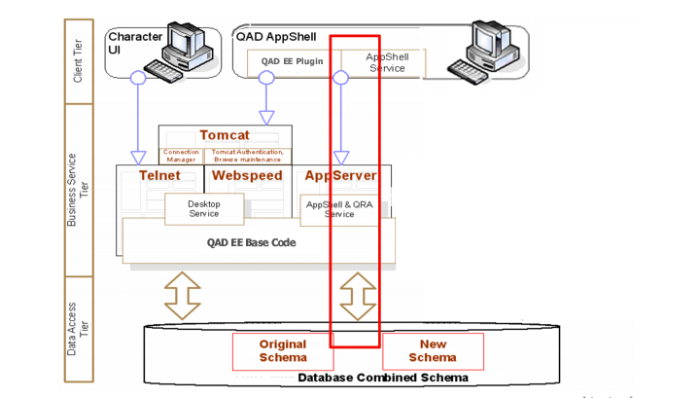
The Planning and Scheduling Workbenches, which includes two separate workbenches (MSW and PSW), a Shortage Report, several supporting browses and programs, and various frames that let you navigate resources, search, display capacity, and so on, is a plugin that runs inside the client; that is, it runs in the AppShell on the user’s computer. The client connects with the database and business logic at the backend, or the server.
A plugin is a computer program that interacts with a host application (a Web browser or an e-mail client, for example) to provide a certain, usually very specific, function.
Schedulers create and maintain schedules in the workbenches, but they can also view how schedule changes impact the production line or work center load, supply and demand, and material availability. They also have simulation capabilities in the workbench. Typically, there is no impact on the database until the user commits by saving the data.
The following graphic depicts client-server interactions. The red line indicates the area of interest for MSW/PSW.
Client-Server Interactions