Search Process
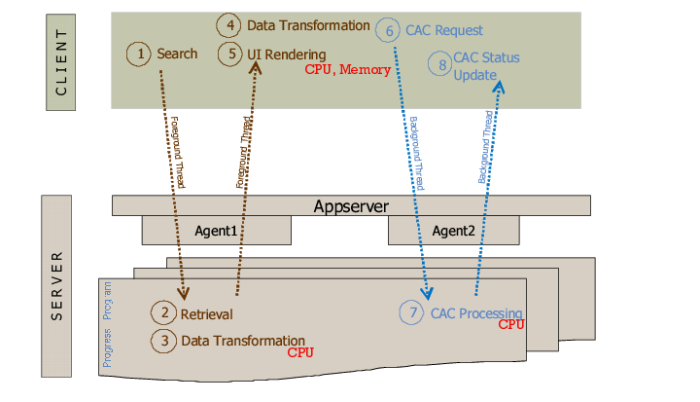
The following occurs when the user performs a search in the workbench:
1 The client sends search criteria to the program, running on the Progress appserver.
2 The program executes a search against the database.
3 The program transforms data into a format that the client needs.
4 The client receives data from the program and further transforms it.
5 The client loads data into memory, which, in turn, loads data on the screen.
6 The client initiates a background thread to compute Component Availability statuses. The background thread calls the Component Availability computation program on the server.
Note: A thread is a flow of control within a program, such as Java or C#, and is either a background or foreground thread. Background threads are similar to foreground threads except that they do not keep the managed execution environment running. So, when the last foreground thread stops, then all background threads stop, and the process stops.
7 The program computes statuses and returns them to the client.
8 The client loads statuses into memory, which, in turn, loads them on the screen.
Search Process