Save Process
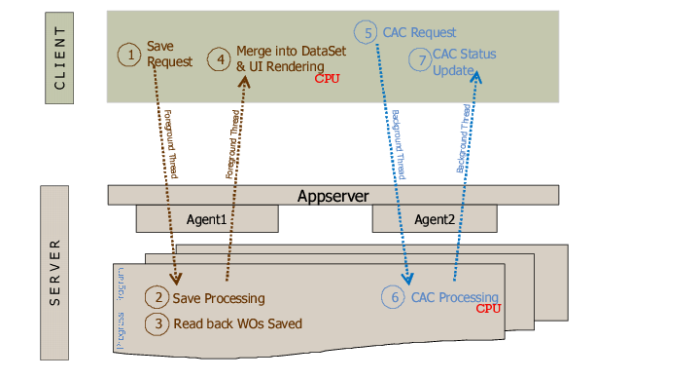
When users save data in the workbenches, the following occurs:
1 The client sends new/updated production orders to the program running on the Progress appserver.
2 The program saves the production orders after they have been validated.
3 The program reads back saved production orders.
4 The client reloads saved production orders into memory that it displays on the screen.
5 The client initiates a background thread to compute Component Availability statuses.
The background thread calls the Component Availability computation program on the server.
6 The program computes statuses and returns the statuses to the client.
7 The client loads statuses into memory which, in turn, loads them on the screen.
Save Process
As noted in the images, some steps demand significant CPU and/or memory resources. These steps largely decide the application response times.
Configure discusses the parameters that affect system load. The key to getting better performance is to affect the system load and help these resource-intensive steps go faster.
Each request from the client results in the system running a Progress program on one of the appserver agents that is not busy. Until the processing for that request is complete, the agent is busy. Concurrent incoming requests are handled by one of the appserver agents that is available. In other words, concurrently running clients share a pool of appserver agents. It is important to ensure there are a sufficient number of agents in the pool to service all concurrent clients. Having insufficient agents results in incoming requests being queued, which adversely affects response times.
Steps that are resource intensive on the server are likely to keep the appserver agent busy longer. As the number of workbench users grows, it is important to monitor appserver agent usage and if necessary, to increase the agent pool size by configuring the appserver.