QAD 2017 Enterprise Edition
>
User Guides
>
Planning and Scheduling Workbenches Administration
>
Configure
>
Overview
Overview
This section describes how the plugin is internally configured. It describes the layout and location of the configuration XML file. It also provides an example and procedures to add a new browse to the workbench.
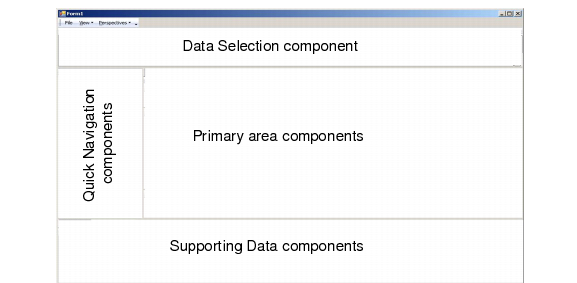
To understand how you configure the workbench, you must first understand the general layout of the workbench. The workbench user interface is divided into four areas:
1 Data selection: This area includes the basic search fields and expanded search fields that let you filter records the system retrieves in the workbenches. This area lets users select records from a very broad range—for example, all records associated with a site—to a very specific set of records—for example, a small set of orders for a particular production line. Users can optionally set user preferences so that the amount of time for the retrieval displays.
2 Primary data: This area is the heart of the MSW and PSW workbenches as well as the shortage report and Component Availability features. It is the area in which most users spend their time. Users select fields, rows, columns, or multiple fields, rows, and columns to manipulate data. They can also drag and drop data in this area within the MSW. Selections made in this area can change the data that displays in the supporting data area.
3 Quick navigation: This area is similar to the quick navigation that displays in many Internet browsers that helps you quickly navigate through an abundance of data.
4 Supporting data: This area includes browses and other programs that display data that supports the primary data. Programs that are new for the Planning and Scheduling Workbenches as well as browses are available through a row of tabs.
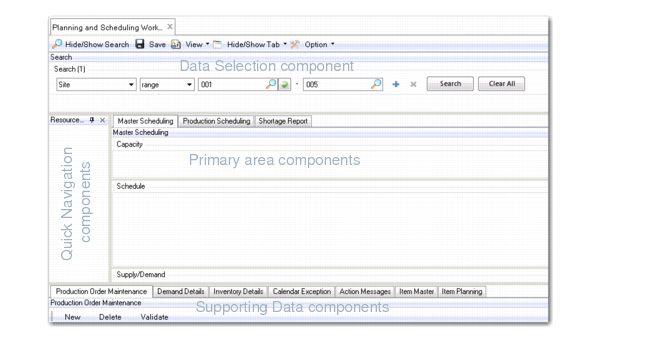
For the MSW/PSW plugin, the components that make up the four areas are as follows:
1 Browse component, qpbr001.p
2 Resource Navigator component
3 MSW, PSW and Shortage Report components
4 Browses Demand Details, Inventory Details, Calendar Exception, Action Messages, and Item Master data and maintenance programs, Production Order Maintenance, and Calendar Exception Maintenance
Workbench Layout
The following graphic depicts the components on the actual Planning and Scheduling Workbenches UI to help relate the components to the interface.
UI with Components