Enabling the Workbenches
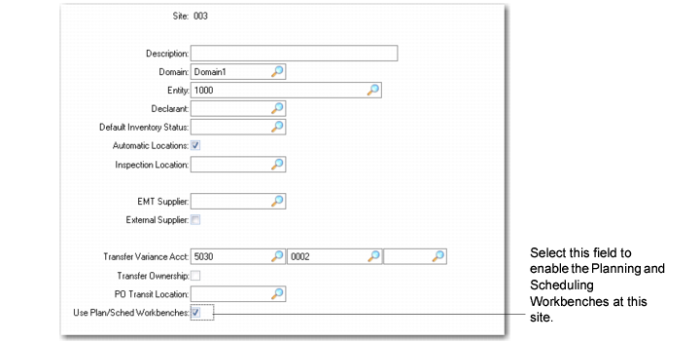
You must set the Use Plan/Sched Workbenches field within QAD EE Site Maintenance (1.1.13) so that your site is enabled to run the workbenches.
Site Maintenance (1.1.13), Use Plan/Sched Workbenches Field
Use Plan/Sched Workbenches
Select this field to enable the Planning and Scheduling Workbenches for this site.
No: You cannot run the MSW or PSW workbenches for this site. Use Work Order (16) and Repetitive Menu (18) programs as usual.
Yes: Setting this field to Yes lets you use the MSW or PSW for this site.
When a site is enabled to run MSW or PSW, you run MRP for the site to create planned orders; then within MSW, you run a search to retrieve the orders for the item/site.
So, when a site is enabled to run the MSW and PSW workbenches, Capacity Requirements Planning (CRP) runs as part of MRP for orders that have a P status. When CRP runs as part of MRP, the system:
• Explodes planned orders as they are created
• Lets you access the orders using the work center schedule resource in MSW
Setting this field to Yes also disables the following programs:
• Schedule Explosion (18.2.4)
• Cumulative Completed Maintenance (18.6)
• Line Schedule Workbench (18.22.1.10)
• Line Allocation Maintenance (18.22.1.11)
• Schedule Explosion (18.22.2.4)
• Cumulative Completed Maintenance (18.22.2.6)
• Planned Repetitive Schedule Approval (23.8)
When you set the Use Plan/Sched Workbenches field to Yes, you can use Schedule Maintenance (18.2.1 and 18.22.2.1) to enter repetitive schedules or create scheduled work orders; however, you should note the following:
• When more than one scheduled work order exists for the same domain, item, site, production line, and/or due date, you:
• Can only change the order quantity from a non-zero number to 0. When you change the order quantity to 0, the system deletes the corresponding set of scheduled orders for that due date.
• Cannot make changes to the scheduled quantity, routing, or BOM code.
When you try to make changes to the areas described, the system displays a message, indicating that more than one order exists for the production order due date.
• When you modify the order quantity, the routing, or the BOM code, the system updates the scheduled order.
• When you change the order quantity to 0, the system deletes the corresponding set of scheduled orders for that due date.
• When you enter a new record, the system creates a scheduled work order. The system accepts valid alternate routing and BOM codes and creates a repetitive schedule master record that matches the scheduled work order; however, the system does not store the repetitive schedule alternate routing and BOM code in the repetitive schedule master. Instead, it stores it in the scheduled work order. This is consistent with how the workbenches generate new scheduled orders.
When you enable the workbenches, the system recalculates schedule consumption that was calculated in these programs:
• Backflush Transaction (18.22.13)
• Reject Transaction (18.22.16)
• Rework Transaction (18.22.17)
• Scrap Transaction (18.22.18)
• Move Transaction (18.22.19)
• WIP Adjust Transaction (18.22.21)