Set Up Production Lines
You can set up items on production lines to be updated in a mass update method within QAD EE:
• Use Production Line Item Create (18.22.1.20) to set up items on production lines in a mass setup method.
• Use Production Line Item Update (18.22.1.21) to update the production lines/item in a mass update method that you previously set up using Production Line Item Create.
Production Line Item Create
If you have used QAD EE for scheduling, you probably have production orders, but you may or may not have items on production lines set up. To create a repetitive master and production schedule for production lines, and not work centers, you must have items tied to a production line or lines. To avoid manual re-entry of setup data, you can use Production Line Item Create to:
• Mass set up items on primary production lines.
• Mass set up items on alternate production lines.
This ensures that the MSW/PSW displays data and alerts the scheduler of all items requiring attention.
Since this program automates the setup of items on production lines, it also reduces the chances of newly introduced items not being added to a production line, which would prevent you from scheduling the item.
The program locates sites where the item routing contains a specified work center/machine, and for those items, associates the items with a specified production line. If the item has no routing (no item/resource record), the program does not find the item to associate with a production line.
The output report contains the following information:
• For each item, the current primary production and alternate production lines
• For each item, the new target production line
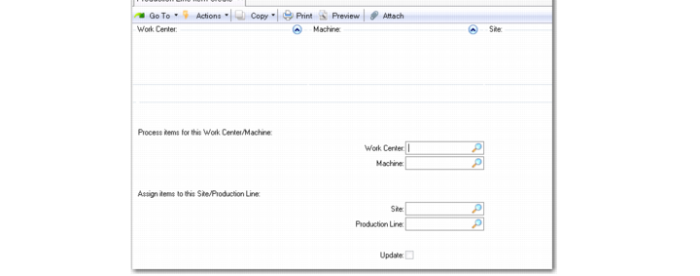
Production Line Item Create (18.22.1.20)
Process Items for this Work Center/Machine:
Work Center
Items processed by this work center within the routing.
Machine
Items processed by this machine within the routing.
Assign Items to This Site/Production Line:
Site
The site to process.
Production Line
The production line to associate items to for the update.
Update
Specify Yes to update according to criteria you set here.
Production Line Item Update
You can use Production Line Item Update to mass update the setup. Use the program to:
• Apply the default production line run rate against all items on a production line.
• Apply run rates to production lines.
• Make a production line the primary line.
• Delete items from a production line.
• Update the Pur/Mfg code for all items on a production line when you have not historically maintained the Pur/Mfg code. The following table shows you the Pur/Mfg codes for production orders and order types. This information is useful when you have not maintained Pur/Mfg codes before.
Pur/Mfg Codes for Production Orders
Pur/Mfg Code | Production Order Status | Production Order Type |
N/A | P | Generic |
Blank | F | Discrete |
M | F | Discrete |
L | E | Repetitive |
All others | F | Discrete |
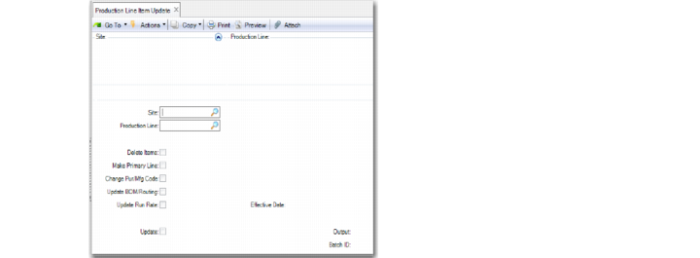
Production Line Item Update (18.22.1.21)
Site
The target site for the production line/items.
Production Line
The target production line/items for applied actions. This field works in conjunction with the Make Primary Line field. When Production Line is blank, you cannot change Make Primary Line to Yes.
Delete Items
Lets you remove all items from production lines.
Make Primary Line
Lets you change the primary line of the existing item/production line target relationship. This field works in conjunction with the Production Line field. You can only set Make Primary Line to Yes when you specify a production line in the Production Line field. When Production Line is blank, you cannot change Make Primary Line to Yes.
Update Run Rate
Lets you apply the production line run rate against all items assigned to the target production line.
The Effective Date field associated with the Update Run Rate field informs the system of the starting point at which to update production line records. For example, you may only want to update recent records to reflect the new run rate but not older records because your company retains older records for historical purposes.
Change Item Pur/Mfg Code
Lets you change the item master and site master (if it exists) Pur/Mfg code on all items associated with the production line.
Update BOM/Routing
Lets the system default existing BOM/routing codes from either Item-Site Planning detail records when they exist or Item Planning Maintenance master records when detail records do not exist to existing production line records. The system defaults the BOM/routing for sites for which you enabled the workbenches. Note that when the BOM/Routing are blank on the detail or master records, the system leaves the BOM/Routing blank. Once the Update program completes, you can update individual records on an as-needed basis and adjust the defaults when needed.