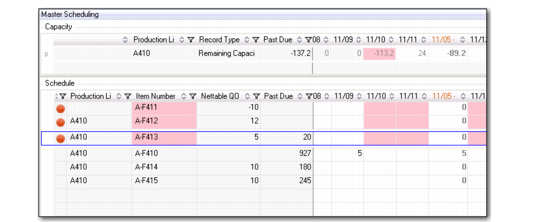
MSW Schedule Grid Data
The Schedule Grid displays item supply records—production orders—with bucketed quantities of the production order supply records for the item. The records represent the master production schedule for a given period. When you select an item by clicking a daily schedule cell, the entire row is highlighted within blue lining. Additional visual indicators call your attention to potential issues.
Also, you can expand and collapse the Schedule Grid to show schedule quantities in weekly and monthly buckets. The weekly and monthly buckets are display only.
When you make a change that remedies the problem, the system updates the cell to remove the color indicator.
Schedule Grid
The following topics describe fields unique to the Schedule Grid. Other fields also found in other QAD EE programs are not described below:
Item Number
The valid system item number.
Nettable QOH
This column displays the nettable inventory on-hand. Nettable is an inventory status attribute that determines whether MRP includes items in its planning. As you scan items, use the data in this column to monitor inventory levels and easily identify inventory levels with issues or concerns.
Past Due
The MSW Past Due field displays past due scheduled quantities.
You can also display the run sequence of an item in the grid. If multiple items are produced on a single production line, efficiency can be improved by producing the items in a certain order. Run sequences let you control the order, or sequence, in which items are scheduled on a production line.