Working with Order Summary List Data
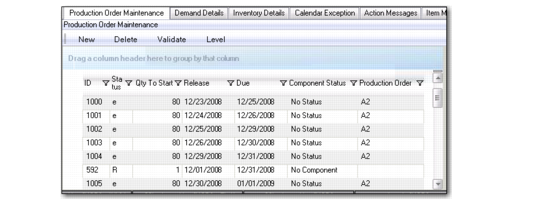
When you select items in the Schedule Grid, you can manipulate order data through two-sided Production Order Maintenance functions. The left side includes a summary list, while the right side includes details.
The summary list starts with orders that have operation due dates on the selected day. To view past-due orders, click the up arrow in the summary list. To show additional records for the current day or for future days, click the down arrow. The sequence in which orders are listed is based on the due date of the order and the production order ID.
You can update some fields directly in this panel. Changes applying to the production order itself update QAD EE when they are saved.
Summary List
Production Order
The production order identifier. This can be the system-generated order ID from QAD EE. If you enter a new order, the system retrieves the next available number from QAD EE or you can optionally enter your own production order value.
ID
A production order lot identifier. The production order number and lot ID work together to identify a specific production order. The same production order can be used with different lot IDs.
St(atus)
The current status of the order. With some restrictions—for example, you can only change a firm order back to planned when you have not saved—you can update the status as needed. When you save your changes, the system updates the QAD EE order with the new status.
Release
The date this production order is scheduled to be released to production. The date you enter here changes to the actual release date when you release and print the production order. Release dates also determine the date components are required. Normally components are picked when an order is released.
The system calculates either release or due date, creating, in effect, forward or backward order scheduling.
Due
The due date defaults to today’s date plus the manufacturing lead time for the item. The due date is the date this order is due to be completed. This is the date you plan to have product available for shipment to the customer or issue to another manufacturing order. All MRP plans are based on this due date.