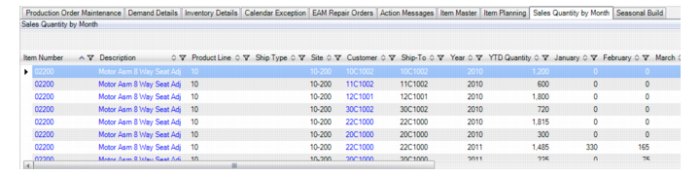
Sales Quantity By Month Tab
Using the fields in the Sales Quantity By Month Tab you can track sales history data by viewing the items, product lines, ship type, site, customer, ship-to, year, and year-to-date quantity. The panel displays quantities in a month-by-month grid so that you can track invoiced sales orders.
Sales Quantity By Month
Item number/Description
The ID and description of the consignment item.
Product line
The product line for the consignment items. You use Product Line Maintenance (1.2.1) to tailor consignment accounts for items that belong to a particular product line. When you do not define specific product line accounts, the system uses the default GL accounts from Domain/Account Control.
Ship type
Enter the ship type for the consignment order. Shipping consigned inventory uses the same process as shipping non‑consigned inventory.
Note: The difference between shipping consigned and non-consigned inventory is in the booking of transaction history and accounting. You own consigned inventory until the customer notifies you that it is consumed.
Site
The site of the consignment order.
Customer
The customer ID for the consignment order.
Ship-to
The ship-to address for the customer. When orders are shipped, the system transfers inventory to the location representing the customer.
Year
The year for the consignment order.
Year-to-Date Quantity
The accumulated consignment item quantities for the year to the current date.