Displayed Calculation Results
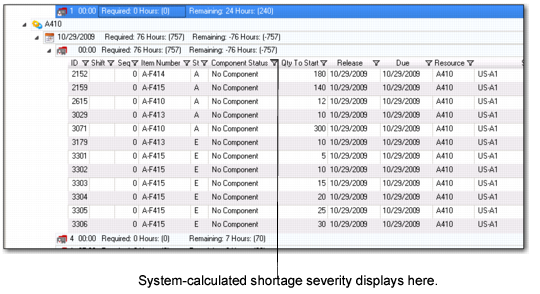
The calculation results display in the Component Status column within the PSW Sequence Grid. They also display in the summary list of the Production Order Maintenance tab and in its Components sub-tab.
Sequence Grid, Component Status Column
The Component Status column displays a textual description of the status. The following lists the possible component status in order of severity.
No components: The work order does not have any components.
Issued complete: All materials have been issued for the work order component.
Available: Sufficient inventory is projected to be available for the production order component. This includes nettable on-hand inventory and non-expired component supply.
Note: Nettable inventory includes inventory that may not be of inventory status available.
Scheduled Receipts: Sufficient inventory is projected to be available for the production order component. This includes nettable or non-expired inventory, plus authorized receipts and firm purchased and manufactured receipts component supply.
Authorized Receipts: Sufficient inventory is projected to be available for the production order component. This includes nettable or non-expired inventory and authorized purchased (unconfirmed ASNs) and manufactured (allocated and released) receipts component supply.
Planned Receipts: Sufficient inventory is projected to be available for the production order component. This includes nettable or non-expired inventory, plus authorized receipts and Firm Receipts, and planned purchased and manufactured planned receipts component supply.
Projected Shortage: There is insufficient inventory projected to be available for the work order component after considering all sources of component supply.
Shortage: Same as Projected Shortage, but only applies to work orders with status A(llocated) and R(eleased).
No Status: Component Availability not computed for the component. This can occur because:
• Component excluded from Component Availability check per user preference settings.
• Components where item master issue policy is set to No.
• Type of BOM component; some component types are not factored by MRP, so Component Availability does not process them either.
• Component Availability horizon does not include the production order and associated components during processing.
• MRP detail records have been deleted since data was loaded into the workbenches; to check, you can run MRP and a perform a new search on the workbenches.
• Authorized Receipts Delayed: The same as Authorized Receipts except that the ASNs or work orders covering the requirement are past due (due date < today).
• Scheduled Receipts Delayed: The same as same as Scheduled Receipts except that the POs or Work Orders covering the requirement are past due (due date < today).
Note: The status also applies to the Release Production Orders by Production Line, Manage Materials for Production Line, Release Production Orders by Work Center, and Manage Materials for Work Center component availability browse collections within QAD EE.
Production Order Status
When calculating component availability, the system considers the status of a production order. Production orders can have a status of:
• (A)llocated
• (B)atch
• (E)xploded
• (F)irm
• (P)lanned
• (R)eleased
The system groups the production order statuses into three status categories when calculating component availability:
• Planned: Planned production orders are in this category.
• Firm: Firm, Batch, and Exploded production orders are in the Firm category.
• Authorized: Allocated and Released production orders are in this category.
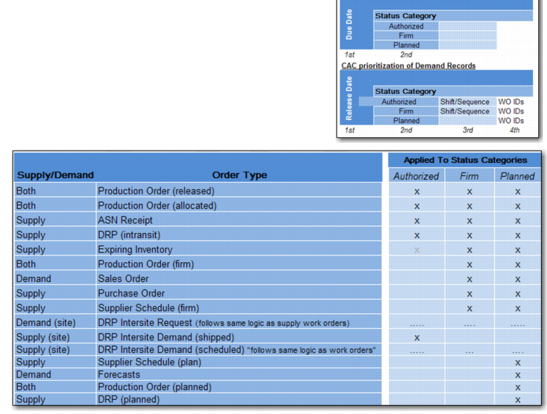
The following depicts where the system applies demand/supply records to the appropriate status category.
Supply/Demand and Status Categories
The steps the system follows for sequenced production orders to calculate their POH and Component Availability status are as follows:
1 Determine the status category for a production order.
2 Within a production order status category, process by due date, then shift.
3 If no shift start time is defined, then shift processing is sequential (1.2.3.4...and so on). Shift 0 is processed last for each status category.
4 Within a production order status category, process by sequence. Sequence 0 is processed last.
5 If no sequence number is defined, process by production order ID.