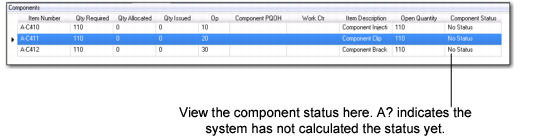
Component List
When you select the Component sub-tab within the Production Order Maintenance tab in the workbenches, component information is divided into two parts: the left side displays the BOM list of a production order, including component status, picking and issuing status, while the right side provides more data through tab selections.
Important: The system shows one level down in the BOM only, except when there is a phantom at that level.
Component Summary List
Item Number/Description
The number and description of the component that is behind the component status of the selected production order in the Sequence Grid.
Component Status
The status related to the POH of the component.
Quantity Required
The original quantity required for the item/production order.
Quantity Allocated
The quantity allocated for the item/production order.
Quantity Issued
The quantity already issued for the item/production order.
Op
The ID of the operation from where the component is backflushed.
Work Center
The ID of the work center to which the component is issued.
Component POH
The system-calculated value for projected quantity on hand for the component, considering all prior demand/supply, including the demand of the selected order. This does not include future production orders of Authorized status; however, Allocated/Released would also be included in the POH calculation.
Open Quantity
The open quantity for the production order.
Note: You can add/remove fields to this panel in the .NET UI Browse Maintenance program.