Display Co-By Product Items
For production lines, use either the MSW or PSW to display:
• Base process items
• Co-/by-product items
• Co-/by-product production orders
• Co-/by-product joint order sets
For work centers, use only the MSW to display:
• Base process items
• Co-/by-product items
• Co-/by-product orders
• Co-/by-product joint order sets
The MSW Schedule Grid displays all base and co-/by-product items and production order quantities by production order due date of the base process production order. Work center data includes the display of quantities by operation due date of the base process production order. Production lines display order header record data; work centers display production order operation record data.
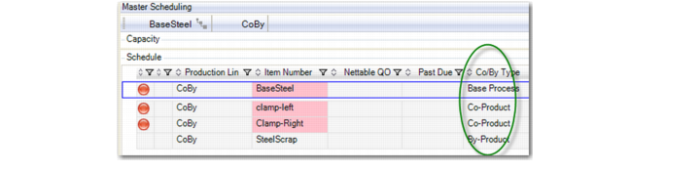
Note: To suppress base process items or by-product items from the Schedule Grid, you must add a column to you view to filter out base and by-product item types. You add the Co/By Type column by right-clicking and selecting to add a column. The following graphic depicts the column in the MSW Schedule Grid.
Note: The PSW Schedule Grid only displays the production order records of the base process item.
Disabled Fields
In the Production Order Maintenance frame within the workbenches, fields that do not allow you to input values are disabled and grayed.
Fields in the Details Frame in the Production Order Maintenance portion of the MSW are disabled for all co and by product orders.