Equipment Mapping
To set up EAM for workbenches integration, you must set up the mapping between the equipment entries of interest to the QAD ERP production lines and work centers of interest. This is done using these EAM programs:
• System Administration/Equipment Mapping to ERP
• System Administration/Production Line Mapping to ERP
Equipment Mapping to ERP
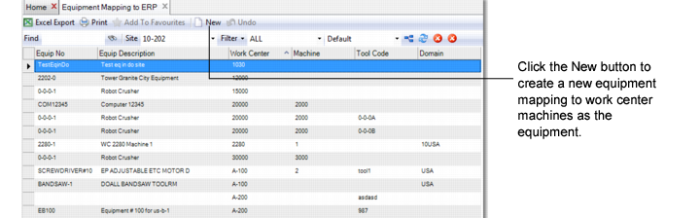
Under System Administration, select Equipment Mapping to ERP to create a new equipment record for your work center.
Equipment Mapping to ERP
1 Click New to enter a new equipment mapping.
2 Specify the work center as the equipment.
3 Enter other fields as required; then, save your data.
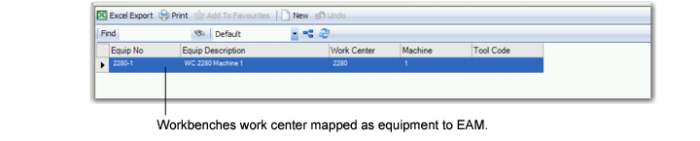
You should see your work center as equipment in any of the EAM equipment lists, as shown in the following figure.
Equipment Mapping to ERP, Work Center
Production Line Mapping to ERP
You can also map a production line to ERP as you did the work center.
Note: You can map an equipment instance to either a work center or a production line, or both; however, it is not required that you map both. It is only necessary to map EAM machines to ERP work centers if the item that is scheduled on the production line has a routing that contains the ERP mapped work center.
In Production Line Mapping to ERP, click New, then enter the workbenches production line data.
Production Line Mapping to ERP