Conversions from eB2.1 or Later
If you are converting from eB2.1 or later, the preconvrep.zip file contains data (*.d) files that you must load into the qadadm and main databases for the Domain Table Extension utilities. The following table describes into which database the files are loaded.
Database File Inventory
|
Database
|
Files in <preconvrep_install_directory>
|
|
qaddb
|
cd_det.d, lpmd_det.d, mnd_det.d, mnt_det.d
|
|
qadadm
|
lbl_mstr.d, pgmi_mst.d
|
If you are running eB2.1 SP6 (QAD 2007.1) or later, you receive errors when loading some of these files because the system already contains this data. You can ignore these errors.
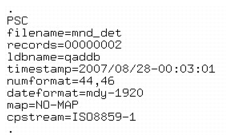
These data files contain trailer details with settings related to the database from which they were dumped. The following figure shows one such trailer.
System Data File Trailer Section
These settings may not match your settings. If they differ, temporarily change your database startup parameters to match QAD’s. You can also edit the trailer details of each file to reflect your database startup parameter settings to ensure that the data loads properly.
The following table lists the values that QAD uses for its startup options.
Startup Option Values
Option | Parameter Name | QAD Parameter Setting |
-d | Date Format | mdy |
-yy | Century Year Offset | 1920 |
-ld | Logical Database Name | qaddb and qadadm |
-numdec | Numeric Fractional Separator | 44,46 (comma for thousands, period for cents) |
-cpstream | Stream Code Page | ISO8859-1 |
protermcap-entry | PROTERMCAP file setting to indicate whether to use a different character translation from the current stream when reading an input stream. | NO-MAP |
In addition, you compile the following programs and put them into the us/ut subdirectory under the directory where the pre-conversion code was installed:
• utqtabs.p
• utqtabsa.p
• utqtplsd.p
• utqtpsda
Note: If you are running eB2.1 SP6 (QAD 2007.1) or later, you already have utqtabs.p, utqtabsa.p, utqtplsd.p, and utqtpsda installed and do not need to compile these files.