QAD 2017 Enterprise Edition
>
Installation-Conversion
>
Conversion Guide
>
Post-conversion
>
Data Validation
>
Post Conversion Integrity Check (36.16.23.3, acinckrp.p)
Post Conversion Integrity Check (36.16.23.3, acinckrp.p)
Use this report to produce a post-conversion report to assess the status of the financial transaction data after conversion.
Note: Run the corresponding pre-conversion report (gpinckrp.p) before conversion. Otherwise, the content of the report is inaccurate.
The report is split across domains with one section per domain. Each of the domain sections is broken down into the following subsections:
• GL Transaction Integrity
• AR Transaction Integrity
• AP Transaction Integrity
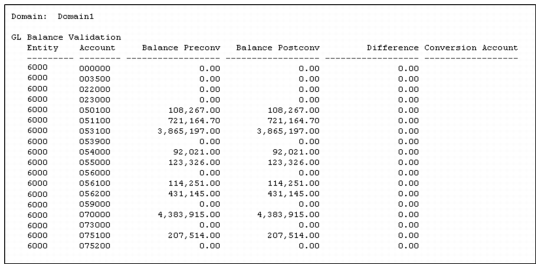
GL Integrity has two modes. Summary mode only displays accounts containing differences. Detail mode shows all accounts, even when there are no differences between pre- and post-conversion balances.
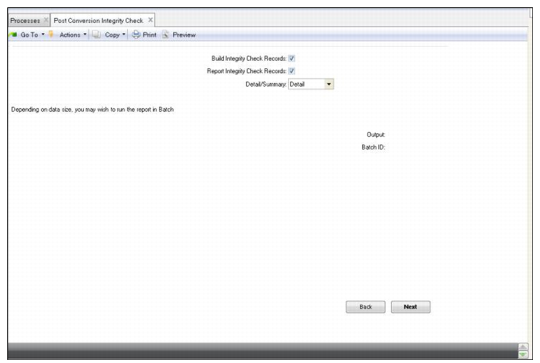
1 Run the Post Conversion Integrity Check report.
Post-conversion Integrity Check Menu
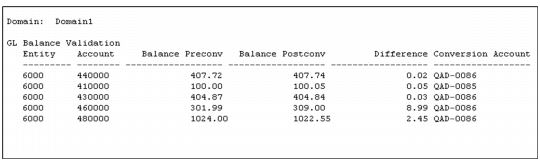
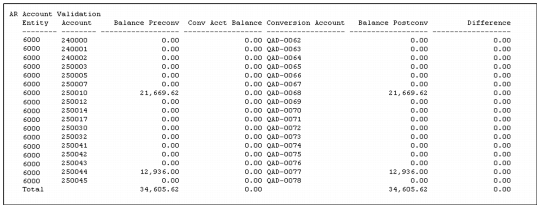
The report should show that the data is in the same condition as before conversion. Unbalanced GL transactions from the current period, which the conversion balances, will be different.
Post-conversion GL Integrity (Summary)
Post-conversion GL Integrity (Detail)
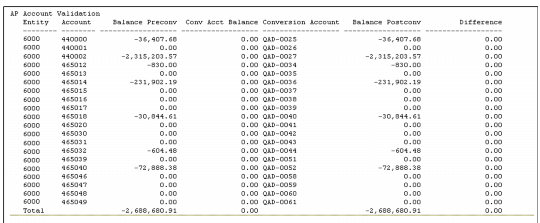
Post-conversion AP Integrity
Post-conversion AR Integrity
2 Analyze the report output.