Running the Fixed Assets Migration Utility
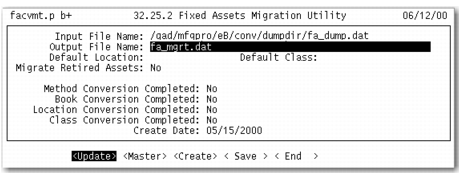
The following sections describe the Fixed Assets Migration Utility (32.25.2). Use this information to map the legacy data model to the enhanced model and to resolve discrepancies. When ready, select the Create option on the Fixed Assets Migration Utility screen and press Enter to load the data into the enhanced Fixed Assets module.
The Fixed Assets Migration Utility tracks migration process milestones. It also lets you map the individual migration data types—methods, books, locations, and classes—in stages and then save these intermediate stages to a migration file. After you have mapped all of the legacy data to the enhanced data model, select the Create option and press Enter. This action loads the data from the migration file into the enhanced Fixed Assets module.
Important: This update can only be done once.
Fixed Assets Migration Utility (32.25.2)
Most of the fields in the Fixed Asset Migration Utility header cannot be updated. They display current mappings set in detail menus and screens. Use the options at the bottom along with the Enter key to access the detail menus and screens. The following sections describe these features in detail.