Conversion Methods
Use Method Migration to convert legacy depreciation methods to the depreciation methods supplied with the enhanced Fixed Assets module.
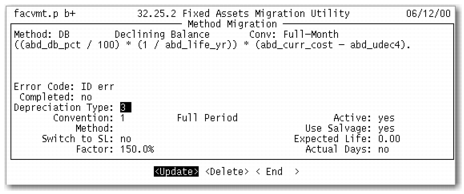
To convert legacy methods, use the following figure and instructions.
Method Migration
1 Use the arrow keys to scroll through the legacy methods. The legacy method, description, convention, and equation display.
2 If an asset does not use this method, select the Delete option and press Enter to remove it. The system verifies that the method is not used and prompts to confirm the deletion.
3 To convert the legacy method, select the Update option and press Enter.
4 In the Depreciation Type field, select the enhanced depreciation method that most closely resembles the legacy method. The following depreciation methods are supplied with the enhanced module:
• 1: Straight Line
• 2: Units of Production
• 3: Declining Balance
• 4: Sum of the Years’ Digits
• 5: Flat Rate
• 6: Custom Table
5 To modify the standard depreciation methods supplied with the enhanced Fixed Assets module, complete the following fields:
• Convention
• Method
• Switch to SL
• Factor
• Active
• Use Salvage
• Expected Life
• Actual Days
Note: If you are using the custom table depreciation method, define a custom table in Method Maintenance (32.1.1) before mapping it to a legacy method. Use the same method ID from Method Maintenance for the method in Method Migration.
6 If an error exists with the new method, the Error Code field displays one of the following tables:
• ID_err: An error exists with the new method ID. For example, the method ID is missing or there is a duplicate method ID.
• type_err: An error exists with the new method description. For example, the enhanced module does not support the method.
• conv_err: An error exists with the new convention. For example, the convention is missing or the convention is not compatible with the method.
• table_err: An error exists with the new table method. The following are examples of possible errors:
• The corresponding method defined in Method Maintenance is not a custom-table method.
• There is a discrepancy with the estimated life.
• Table detail is undefined in Method Maintenance.
• life_err: An error exists with the new life. For example, the method is a custom table and the new life is zero.
7 After you correct any errors, the Completed field updates to Yes for the converted method.
8 Repeat steps 1 through 7 for each legacy method.