Converting Books
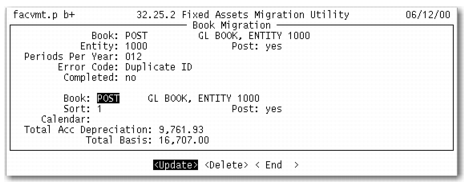
Use Book Migration to convert legacy books to books used in the enhanced Fixed Assets module. To convert legacy books, use the following figure and instructions. In the legacy system, asset cost is associated with depreciation books. Therefore, if an asset contains multiple books, the asset cost comes from the posting book.
Book Migration
1 Use the arrow keys to scroll through the legacy books. The legacy book ID, description, Entity, and Post field display.
2 If no assets use this book, select the Delete option and press Enter to remove it. The system verifies that the book is not used and prompts to confirm the deletion.
Note: Any legacy asset books that use a depreciation type of None are not created in the new fixed asset system.
3 To convert the legacy book, select the Update option and press Enter.
4 Complete the following fields:
• Book
• Description
• Sort Code
• Post
• Calendar
Note: You can have only one posting book in the system. If the book was not a posting book in the legacy system, you cannot change it to a posting book for the new system.
5 Total Acc Depreciation and Total Basis are automatically calculated. Total Acc Depreciation displays the total accumulated depreciation for the legacy book. Total Basis displays the total basis for all of the fixed assets for the legacy book.
6 If duplicate book IDs exist, the Error Code field displays Duplicate ID.
7 After you correct any errors, the completed field updates to Yes for the converted book.
8 Repeat steps 1 through 7 for each legacy book.