QAD 2017 Enterprise Edition
>
Installation-Conversion
>
Conversion Guide
>
Converted Data
>
Accounts
>
Conversion Accounts
Conversion Accounts
The conversion creates a “conversion account” for every general ledger account that is flagged as a control account within the pre-conversion Control Account Utility (uxctrl.p). The accounts use the format QAD-xxxx, where xxxx is a sequential number the conversion assigns. The account description is obtained by concatenating the original account number and description.
Their usage is similar to that of “take on accounts” during a system implementation. Conversion accounts serve as temporary placeholders for Accounts Receivable and Accounts Payable general ledger balances until the sub-ledger transactions are loaded into the database or, in this instance, converted.
During the conversion, a number of different transactional conversions are performed. The first is the GL Transactions conversion. The Supplier Invoice Conversion, Supplier Payment Conversion, Customer Invoice Conversion, and Customer Payment Conversion follow this conversion.
When a transaction that references a control account is encountered during the GL Transactions conversion, the conversion replaces the control account code with its corresponding conversion account code. This replacement effectively moves the general ledger balance from the control account to the conversion account. The control account balances are reinstated during the subsequent Invoice and Payment transaction conversions. Depending on the transaction being converted (Invoice, Credit Note or Payment), the general ledger transactions created debit or credit the control account and offset the conversion account.
Ideally, all conversion accounts have a zero balance following conversion. However, in some situations, balances remain.
In most cases of a remaining balance against a conversion account, an imbalance between the sub-ledger and the general ledger existed before conversion. The conversion simply moved the imbalance from the control account to the conversion account. This action is necessary because within Enterprise Edition, the sub-ledger, and general ledger must be in balance. In this instance, you decide what to do with the conversion account balance.
In instances in which a number of similar type control accounts exist, you could find that balances remain against individual conversion accounts. However, the total of the Accounts Payable or Accounts Receivable conversion accounts has a zero balance. While there are a number of reasons why this situation could occur, a common cause is the correction of sub-ledger transactions using Journal entries within the source database. That is, an invalid Control Account code was used for a transaction and then corrected with a Journal entry. In this case, the conversion account balances can simply be netted off using a Journal transaction and the accounts set to inactive.
Finally, balances could remain due to corrupt data within the source database. Thoroughly investigate and resolve any remaining balances against a conversion account. Once the accounts are balanced, change the status of the accounts to inactive.
GL Transactions
The conversion does not convert the existing GL transactions against the original control account, but instead creates posting lines in QAD Enterprise Financials against the special conversion accounts. This process solves a potential balance discrepancy between the converted sub-ledger (AR or AP) and the converted control account balances for the corresponding accounts (AR control and AP control). Agreement between the sub-ledgers and control accounts is a key check in QAD Enterprise Financials, and you must resolve any discrepancies during the conversion. If a GL transaction is posted to a non-control account, the transaction is converted as-is.
Unbalanced GL Transactions
A database can contain unbalanced GL transactions. A potential cause of unbalanced transactions is that the database contains transactions from other financial software that were previously converted to the QAD application.
Unbalanced transactions in a closed fiscal year are converted as-is. If the entire closed year is out of balance for an individual entity, the conversion creates a balancing transaction. The reason is that if the historical years are unbalanced, the trial balance in QAD Enterprise Financials never balance.
An accounting year is composed of all GL calendar periods for an individual GL calendar year. To determine if a balancing transaction is needed for an entity in a closed year, all converted GL transactions for an accounting year and entity are tracked. If the total does not balance, the conversion creates a new posting and posting line to balance the year and entity. The conversion creates the balancing transaction in the appropriate historical period, and uses the GL account entered in the Conversion Parameters Utility for the balancing transactions.
Note: The calculations that determine if the accounting year is balanced do not include year-end postings (transactions of type YR). Year-end postings are discussed in the following text.
The conversion modifies any unbalanced transactions in an open fiscal year so that the year-end closing process in QAD Enterprise Financials can run without error. The conversion automatically creates a single posting line for the out-of-balance amount against an account specified for this purpose before starting the conversion. This process balances the unbalanced transaction. All balancing changes the conversion makes are recorded in a log file. The balancing transaction can also be easily identified by analyzing the postings made against this special account.
The conversion treats year-end transactions (type YR) differently because these transactions are always one-sided in earlier versions of the QAD ERP application. The conversion always creates a balancing posting line for year-end transactions. This balancing posting line is created in the historical period and uses the P&L (balance sheet) account from General Ledger Control (co_ctrl.co_pl). As noted previously, the year-end posting is not considered when determining if the overall year is balanced.
In European Accounting, the year-end transaction is not one-sided, but must be fully balanced. When European Accounting is used, the conversion does not create a balancing posting line for year-end transactions.
AR Transactions
The conversion posts each total invoice or payment amount to the AR account defined in the customer master. The conversion then reverses this amount from the corresponding conversion account for the AR account of the original transaction.
If the AR account used for the original transaction is not an actual AR control account provided in the pre-conversion Control Account Utility or GL Account Type Utility, the posting line is changed to use the account from one of these utilities. The conversion records changes of this type in a separate log file.
Note: If GL transaction consolidation was performed in the pre-conversion database, and multiple AR control accounts are in use, it is likely that compensating balances remain on the AR conversion accounts. You can correct these balances post-conversion using a journal entry.
AP Transactions
The conversion of AP transactions is similar to the conversion process for AR transactions. One difference, however, is the treatment of duplicate invoice numbers.
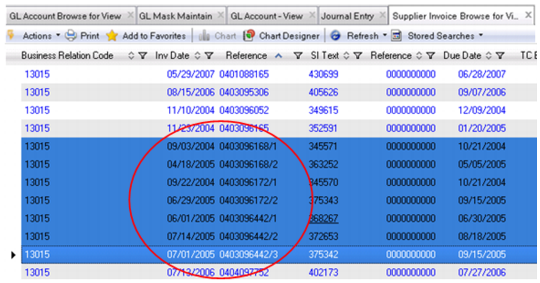
QAD Enterprise Edition prohibits duplicate invoice numbers for a single supplier. Standard Financials provides a warning in this situation. QAD Enterprise Financials displays an error when it finds duplicate invoice numbers. When the conversion encounters a duplicate invoice number for a supplier, it appends a suffix of /n to the invoice number. The /n is any number, such as /1, /2, and so on. The following figure illustrates the use of this suffix.
Duplicate Invoice Number Indication
When the conversion is complete, the remaining balance of the conversion accounts must equal the pre-conversion difference between the GL and sub-ledger. If additional balances remain, investigate and resolve them.
Residual balances in the AR or AP conversion accounts can result from transactions previously posted to the control accounts that did not truly relate to AR or AP. These differences are normally indicated in the Pre-conversion Integrity Report. Complete the following steps to identify specific errors:
• Balance aging by account to the GL for each month.
• Add the balances in all conversion accounts for the sub-ledger (AR or AP) to the converted control accounts for the sub-ledger. This total should be the same as the control account total before conversion.
You can post journal entries to conversion accounts, but not to control accounts, except for Fixed Assets Control accounts.
If the Inventory Control or WIP Control accounts are out of balance, use Issues – Unplanned (3.7, icunis.p) or Receipts – Unplanned (3.9, icunrc.p) to correct the account balance.