QAD 2017 Enterprise Edition > User Guides > Reporting Framework > Exploring the Report Designer Workspace > Shortcut Menus
  
Shortcut Menus
Report Designer provides context-sensitive shortcut menus that give you access to most commonly used functions.
To bring up shortcut menus:
Right-click a report definition under the Reports tab in the toolbox.
Right-click on a blank space in the Design pane.
Right-click an object in the Design pane.
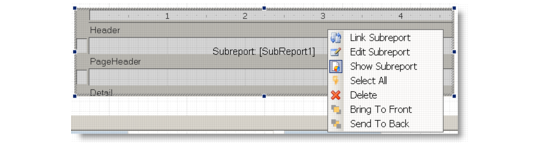
Right-click a subreport in the Design pane.

Subreport Shortcut Menu

Subreport Shortcut Commands
 
Button
Name
Description
Link Subreport
Opens a dialog box that lets you define which records will be included in the subreport by specifying a master field in the main report and a child field in the subreport. This will set the Text property on the subreport field to an expression that will be used as a filter on the subreport data source.
Edit Subreport
Open the subreport fully in the Design pane for editing.