QAD 2017 Enterprise Edition
>
User Guides
>
Reporting Framework
>
Administering Reports
>
Setting Up Access Security for Reporting
Setting Up Access Security for Reporting
Access must be controlled to reporting programs as well as report resources (associated with menu items) so that only authorized persons can gain access to and manipulate reporting data.
You use the system’s role-based access security mechanism to control access to reporting resources in the same way as you do with other menu-level programs in QAD Enterprise Applications.
Setting Up Report Resource Menu Item and Security
Users open reports through report menu items that they have been given access to based on their role membership. Use Menu System Maintenance to create a menu item to provide access to a report resource.
1 Go to Menu System Maintenance (36.4.4).
2 Specify .NET UI Menu in the Type field and select US in the Language field; then press Enter.
3 In the menu structure frame, right-click on a menu item under which you want to create the report menu item and then choose New from the shortcut menu.
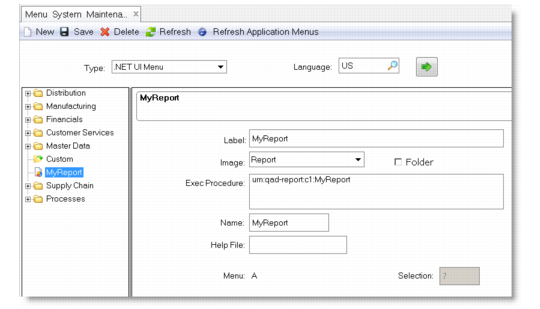
4 Enter the detailed information for the report menu item.
Menu System Maintenance
Label
Enter a name for the report menu item. It does not have to be the same as the report code.
Image
Select Report from the list.
Exec Procedure
Enter a component-based activity specified in the form of a uniform resource name (URN):
urn:qad-report:c1:ReportCode
Where ReportCode is the report code of the report resource you are creating a menu item for.
Name
Optionally, enter a menu name.
5 Click Save on the toolbar to save your changes.
6 Click Refresh Application Menus on the toolbar. When refresh is complete, the new menu displays in the menu tree.
Setting Up the rptAdmin and rptDsgn Roles
You must create two roles—rptAdmin and rptDsgn—in Role Create for the report administrator and report designer/developer respectively, and then assign them to the particular user IDs you would like to perform the associated activities. These roles add another layer of security that controls access to some activities within the programs. Since the activity-level controls are hard-coded in the reporting programs, you will not be able to perform certain activities within these programs if you create roles with other names for the report administrator and report designer/developer.
Note: Make sure you use the correct capitalization for the roles.
You must grant the rptAdmin and rptDsgn roles access to the following programs based on this table:
Program-Role Access Control Matrix
Reporting Program | rptAdmin | rptDsgn |
Report Designer | Allow | Allow |
Template Designer | Allow | Allow |
Report Resource Import | Allow | Allow |
Report Resource Export | Allow | Allow |
Scheduled Report Maintenance | Allow | |
Report Resource Maintenance | Allow | Allow |
Report Parameter Maintenance | Allow | Allow |
Personal User Filter Maintenance | Allow | Allow |
Admin User Filter Maintenance | Allow | |
Report Settings Restore | Allow | |
For details about common access security features, see
QAD Security and Controls User Guide.