QAD 2017 Enterprise Edition
>
User Guides
>
Reporting Framework
>
External Metadata
>
Overview
Overview
This appendix describes an alternative to hard-coding metadata in a data source program. This approach can greatly improve the ease and productivity of writing data source programs. This approach allows metadata information to be externalized to an XML file, which gets loaded at runtime. In addition to the runtime infrastructure required to implement this enhancement, a utility is also provided which allows for generating the following default XML files:
• A reference file containing base XML for each field in the report
• A reference file which provides runtime metadata for specified searchable fields
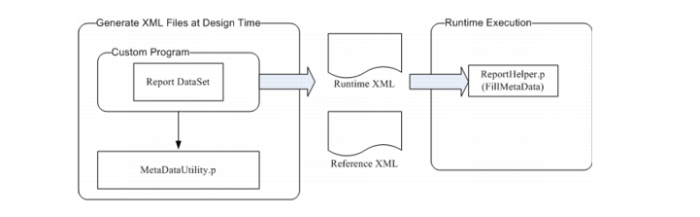
The process for making use of this new capability is illustrated below:
External Metadata
The above diagram shows the design-time and run-time steps to use the XML metadata utility.
1 At design-time, MetaDataUtility.p is used to generate XML metadata files, which can be manually edited to override defaults. The XML files should then be deployed such that ReportHelper.p can read them at run-time to dynamically create the report metadata (typically in the same directory as the report data source program.)
2 The report data source program must call FillMetaData in ReportHelper.p, which creates metadata from the XML at run-time.
The following sections describe these steps in detail.