Auto-generating Revenue Recognition Contracts
The easiest method of creating a revenue contract is by using Revenue Contract Autogenerate (37.1.5). This program enables you to auto-create revenue contracts based on a set of parameters. You can use this menu to generate multiple revenue contracts simultaneously.
Based on the selection criteria, one or more contracts are generated for all sales order lines and invoice history records that are eligible for revenue contract creation. The auto-generate program creates a single revenue contract for each sales order processed, with each sales order line creating its own performance obligation line.
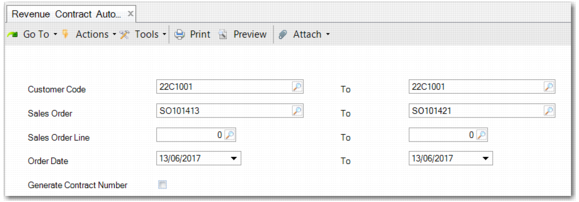
Revenue Contract Autogenerate
Note: You enable auto-generation of revenue contracts at customer level on the Customer menu (27.20.1). In the customer record header, make sure that the customer is active. On the Accounting tab, make sure that Auto Create Revenue Contracts is selected.
The fields in Revenue Contract Autogenerate are as follows:
Customer Code
Enter a customer code range. The range can comprise one or more customers.
Sales Order
Enter a sales order range. The range can comprise one or more sales orders.
Note: Any revenue contract generated by the program uses the sales order number as the revenue contract number, unless you have set up autonumbering and select the Generate Contract Number field.
Sales Order Line
Enter a sales order line range. This field is only relevant when you have entered a single sales order. Where there are multiple sales orders, you cannot select individual sales order lines.
Order Date
Enter an order date range. By default, the Order Date From and To field is populated with the system date. When you click Generate and one or both dates in the order date range are blank, a warning is displayed to indicate that there may be a large data set to process.
Generate Contract Number
Select this field to generate a predefined revenue contract number. The number is generated based on the autonumbering set up in Revenue Contract Autonumber Activate (37.1.50.1).
When you click Generate, the revenue contract is created as active. If the revenue contract requires a review, it is automatically flagged that a review is required. You can carry out a review in the Revenue Contract Menu (37.1)
Note: When running the program for new sales order lines where a revenue contract using the sales order number already exists, choose one of these options:
• To create a new contract for these sales order lines, specify the sales order lines and select Generate Contract Number. The new contract is generated with a number distinct from the sales order number.
• To add the sales order lines to the existing contract, run the program for the whole sales order and do not select Generate Contract Number. A new version of the contract is created, including the new and existing sales order lines.
• To add the sales order lines to the existing contract while removing the existing lines from the new version, run the program specifying the sales order lines. Do not select Generate Contract Number. A new version is created, including only the new order lines. This option is not recommended.
SSM
SSM is a separate module that generates sales order and invoice history records for a variety of activities during the life cycle of a service call or contract. Basic revenue recognition functionality is already included for service contract activities. Therefore, any orders and invoices created directly for the service contract or that are linked activities—such as Invoice Calls, Material Orders, Depot Orders, Return Material Authorization—are skipped during processing. These orders and invoices are excluded from revenue recognition functionality.