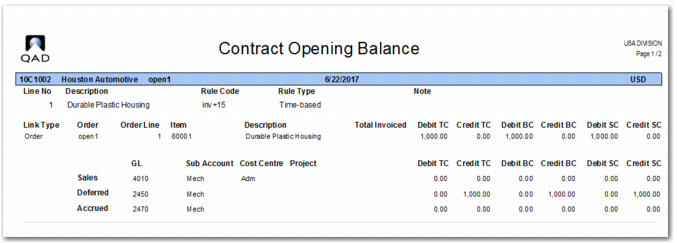
Revenue Contract Opening Balance Report
When opening balances have been loaded into the system, you can check the opening balances loaded using the Revenue Contract Opening Balance report. You can use the filters to select a range of revenue contracts against which opening balances have been created.
Business Relation
Enter a range of business relation codes assigned to customers on the revenue contract.
Contract Number
Enter a range of revenue contract numbers.
Corporate Group
Enter a range of corporate group codes.
Customer Code
Enter a range of customer codes of the revenue contract.
Revenue Contract
This filter controls whether the report displays revenue contracts with opening balances, without opening balances, or all revenue contracts.
The report displays revenue contract information along with the various types of opening balances listed against the different types of GL accounts and analysis. You can cross-reference this information with the GL to verify whether the opening balances in the revenue recognition sub-ledger match the opening balances in the GL.
Revenue Contract Opening Balance Report