QAD 2017 Enterprise Edition
>
User Guides
>
Service/Support Management
>
Taxes in SSM
>
Generating and Reviewing Call Invoices
Generating and Reviewing Call Invoices
Create call invoices directly from Call Activity Recording if Invoice from Recording is Yes in SSM Accounting Control (36.9.10), or generate them from Call Invoice Recording.
When you create a call invoice, the system creates billing detail records for each labor, expense, and item usage record associated with the call. It creates distinct billing records for items issued, items returned, and items exchanged, since each may be taxed differently.
Note: The system also creates billing details for fixed price service; however, they do not include any price information.
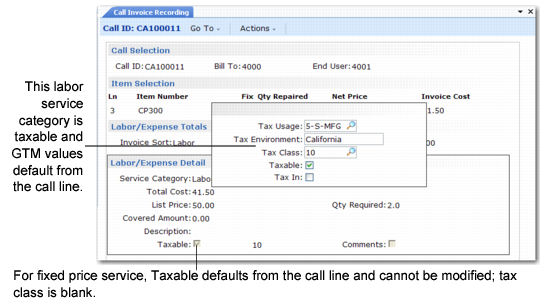
In CIR, you can review and change GTM tax details at the header, line, and usage detail levels as long as the call line is taxable. If the call line is not taxable, you cannot modify tax data elements at the detail level.
GTM Tax Data for Billing Details in CIR
If the call line is taxable, the tax status and class on the detail records default either from Service Category Maintenance or from Item Master Maintenance. You can modify this.
Important: If you make additional changes in CAR for a call line, the system deletes and regenerates the billing records associated with the line. This means that if you have overridden the default tax status or class of a detail record, you must make the change again in CIR.