QAD 2017 Enterprise Edition
>
User Guides
>
Service/Support Management
>
Service Contracts
>
Copying Contracts
Copying Contracts
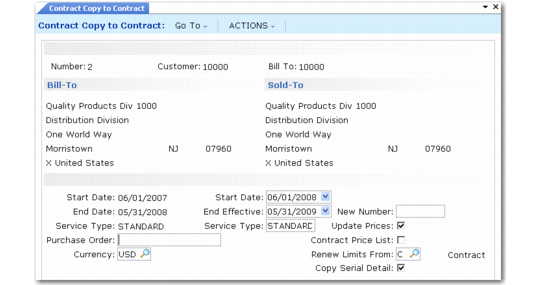
Rather than entering a contract manually in Contract Maintenance, you can create a contract by copying an existing one with Contract Copy to Contract (11.5.13.6).
Contract Copy to Contract (11.5.13.6)
This function is similar to Renew Single Contract (11.5.13.8). To be copied, a contract does not have to be fully billed.
To copy a contract, specify its number in the header. Start Date defaults to the first of the month following the current end date. The system bases the end date on the existing contract’s duration. You cannot set the start date earlier, since this would cause the items on the contract to be covered twice.
Service type defaults from the source contract but can be changed. You can specify a new number for the contract, or the system supplies the next number.
If the new contract should have a different currency, specify it in the Currency field and set Update Prices to Yes to calculate prices in the new currency.
The Renew Limits From field lets you copy limits from the source contract to the new contract, or look back at the service type and copy limits from it. This field defaults from the value specified for the source contract. If the limits on this contract have been heavily customized, you may want to preserve them. If you have set up effective dates on the contract type, you may want to look back at the type to apply the new limits based on the new contract’s start date.
Use this option in conjunction with the Service Type field for full control over service limits. If you specify a new service type and indicate that limits should be copied from service type, the new limits are applied.
If prices or price lists have changed since you generated the previous contract, you can have the system update the prices. If you want to update prices, the system uses either the price list associated with the contract’s service type (Contract Price List is No) or the one associated with the contract.
A contract or contract quote can have multiple lot and serial numbers associated with one line when you use the Serialize option. The Copy Serial Detail field determines if the system includes the lot and serial numbers on the new contract.
• When Yes, numbers are copied to the new contract.
• When No, the system creates a line without lot and serial numbers. In this case, update the new contract manually, since the system does not find coverage for lot and serial-controlled items if these numbers are not specified.