Recognizing Revenue
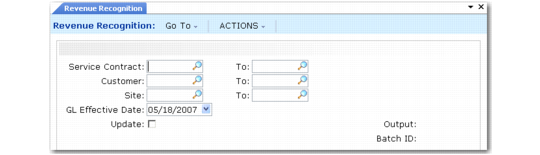
Run Revenue Recognition (11.5.18.21) each month for the system to recognize accrued and deferred revenues for billing cycles other than monthly.
Revenue Recognition (11.5.18.21)
Select revenue to be updated by range of contract, customer, and site codes and indicate when the GL transactions should be effective. Set Update to No to generate a report of revenue amounts that the system needs to update without making any changes. The system validates that you have security access to the site range.
Important: Do not modify the details that have been accrued on a contract after running Revenue Recognition. For example, you can add new contract lines, but do not change the billing cycle or start date of lines that have been accrued.
Deferred Revenue
When the revenue type of a contract is deferred, release the contract for billing to generate a pending invoice. Post and print the invoice. This creates the following transactions:
Debits Accounts Receivable
Debits Sales Discount
Credits Sales (for the current month)
Credits Taxes, Trailer Charges
Credits Deferred Revenue (for remaining billed months)
Posting the invoice also creates revenue records that can be displayed with Deferred/Accrued Revenue Report (11.5.18.22), Accrued Revenue Report (11.22.1), and Deferred Revenue Report (11.22.2). The reports show the invoiced, recognized, accrued, or deferred amounts, and the number of periods left for recognition.
Running Revenue Recognition then creates the following transactions:
Debits Deferred Revenue
Credits Sales
The number of months to bill on the contract must be greater than one. For deferred revenue, running Revenue Recognition is not needed for contracts and contract lines with monthly billing cycles, since monthly billing and accounting functions update revenue totals. However, when the billing cycle is less frequent than monthly, monthly accounting totals do not include unrecognized revenues held in deferred accounts.
Accrued Revenue
When the revenue type of a contract is accrued, you run Revenue Recognition before releasing the contract to an invoice. This creates the following GL transactions:
Credits Sales (for the monthly billing)
Debits Accrued Revenue (for the monthly billing)
Run Revenue Recognition every month until the billing cycle is complete. Then release the contract for billing to generate a pending invoice. Post and print the invoice. This creates the following transactions:
Debits Accounts Receivable (for all billed months)
Credits Accrued Revenue (for all billed months)
For accrued revenue, running Revenue Recognition creates revenue records that can be displayed with Deferred/Accrued Revenue Report (or, alternatively, the Accrued Revenue Report (11.22.1) and the Deferred Revenue Report (11.22.2)). The reports show the total amount to be accrued, the amount already accrued, the amount remaining to be accrued, and the number of periods left for accrual.