Assign Default Profiles to Users and Roles
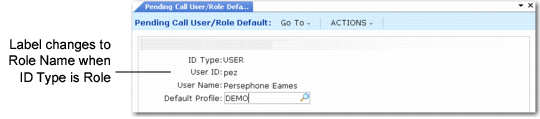
Use Pending Call User/Role Default (11.1.3.19) to assign a default profile to specific users or user roles. This function is optional. If you do not assign profiles with this program, the profile ID designated as the default profile in Pending Call Frame Maintenance applies to all users.
The sequence of frames that displays in Pending Call Maintenance is determined by the default profile associated with a user. Make sure that you have also given users appropriate security access to the default profile in Pending Call Frame Maintenance.
Be careful when assigning default profiles to user roles if your users typically belong to more than one role. In this case, the system assigns them the first profile associated with the first role it finds, which may not be what you want.
Pending Call User/Role Default (11.1.3.19)
ID Type
Indicate the type of default being defined. Valid values are:
User: This default applies to a specific user ID.
Role: This default applies to a user role.
Based on your selection for ID type, you are prompted to enter either a user ID or user role.
User ID
If ID Type is User, enter a valid ID of a user defined with User Maintenance (36.3.1). The full name of the user displays in the User Name field.
Role Name
If ID Type is Role, enter a role defined with Role Create (36.3.6.1). The description displays in the Role Description field.
Default Profile
Specify the ID of the default profile for this user or role. Define profiles with Pending Call Frame Maintenance (11.1.3.15).