QAD 2017 Enterprise Edition
>
User Guides
>
Service/Support Management
>
Call Quotes
>
Expired Quotes
Expired Quotes
Quotes remain in effect for a period controlled by Days to Expire in Call Management Control. The system adds the value in Days to Expire to the quote creation date to determine the quote’s expiration date.
When you access a quote in Call Quote Maintenance, a warning displays if the quote is expired. You cannot release an expired quote. Change the expiration date to reactivate the quote.
Move released or expired quotes to a history table with Expired Quote Move to History (11.1.1.22). Delete and archive quotes from the history table with Call/Quote History Delete/Archive (11.1.1.23).
Moving to History
Maintain quote history on line by moving expired and released (closed) quotes to a history table.
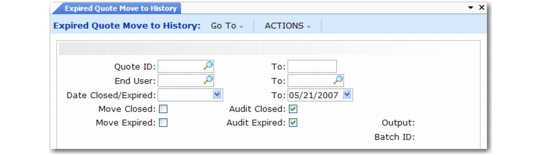
Expired Quote Move to History (11.1.1.22)
Expired Quote Move to History has the following options:
• Select quotes by quote ID range, by end-user range, or by expiration or close date range. Releasing a quote sets the close date.
• Move closed quotes, expired quotes, or both using Move Closed and Move Expired.
• Produce a report of potentially affected quotes without moving them by setting both move fields to No and both audit fields to Yes.
Expired Quote Move to History copies quotes meeting the specified criteria from the call master (ca_mstr) to call history (chm_mstr), then deletes the quote from call master. You can save the quotes in the history table, or delete and archive them with Call/Quote History Delete/Archive (11.1.1.23).
Moving a quote to history removes any general allocations or engineer load associated with it.