Engineer Availability Inquiry
Use Engineer Availability Inquiry (11.13.15.11) to view information similar to that in the Engineer Availability pop-up in Call Maintenance. In Call Maintenance, the system considers five factors to evaluate availability:
• Engineer skill matching the call problem
• Availability on the call’s next event date and time
• Engineer area matching the call area
• Engineer being the primary or secondary engineer assigned to the call’s end user
• Engineer time zone matching the defined range around the end user time zone, when MTZ is active
You must supply the same call information the system uses to calculate availability: area, date and time, problem, and time zone. The only factor the system does not consider in the simulation is the points awarded for the primary or secondary engineer, since this information is specific to an end user.
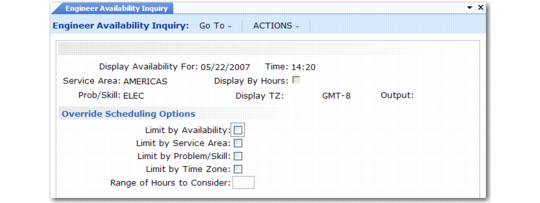
Like Call Maintenance, this inquiry considers the scheduling limits you define in Engineer Schedule Control. If Override Scheduling Options is Yes in the control program, the same pop-up displays as in Call Maintenance. Here you can limit the set of engineers to consider. Otherwise, the system applies limiting factors that you defined in Engineer Schedule Control.
Note: When MTZ is active, additional scheduling options display.
Engineer Availability Inquiry (11.13.15.11)
Important: If Limit by Service Area is Yes and you do not specify an area, the system considers only engineers without a defined area. If Limit by Problem/Skill is Yes and you do not specify a problem or skill code, no engineers display.
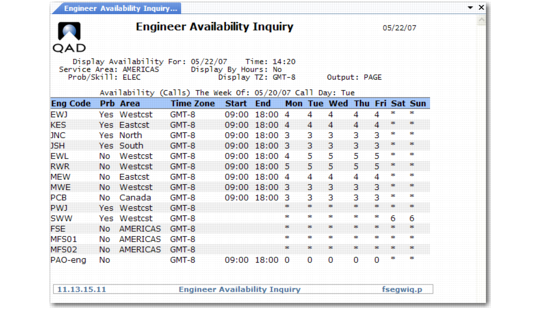
The report output is identical to the output in the Engineer Availability scrolling window in Call Maintenance, except that the report does not show point totals.
Engineer Availability Inquiry (11.13.15.11)