QAD 2017 Enterprise Edition
>
User Guides
>
Service/Support Management
>
Depot Orders
>
Depot Item Restocking
Depot Item Restocking
Use Depot Item Restock (11.1.2.4) to restock inventory with items that were originally returned by customers, repaired in-house, and then restocked in refurbished inventory.
Note: This program is available from the Depot Order browse as well as the menu.
Restocked items may have a different item number to indicate that the item is a refurbished—as opposed to new—unit. You can give an item that will be restocked a different item number by entering a value in the Alternate Item Number field in Depot Order Maintenance.
Depot items must be received before they can be restocked. If required, site information may be updated.
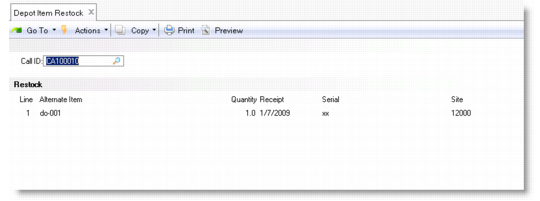
Depot Item Restock (11.1.2.4)
Only depot order lines that have a complete status can be restocked. The line selected is passed to the Receipts–Return to Stock (3.11) program. The installed base is updated to reflect that the item was restocked into inventory and removed from the customer’s installed base.
Call ID
Enter a valid call ID. The call must be a replace type of depot order line and have a status of complete in order for the item to be restocked. If the call has a status of closed or hold, the restock frame does not display.
Line
Enter a number identifying a detail line. Only one line at a time can be entered for restocking.