QAD 2017 Enterprise Edition
>
User Guides
>
Sales
>
Sales Quotations
>
Setting Up Sales Quotes
Setting Up Sales Quotes
To create a sales quote, first set up standard data—customer addresses, sites, item masters, and so on. For example, if you track salespersons and commissions, set up records in Salesperson Maintenance before issuing sales quotes.
Use settings in two control programs to tailor the Sales Quotations module to the way your business works. You can define general controls for the current domain, as well as establish default values for managing sales quote functions:
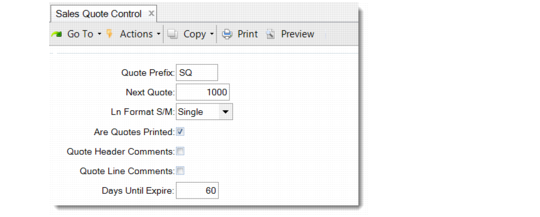
• In Sales Quote Control (7.12.24), define several operational control values.
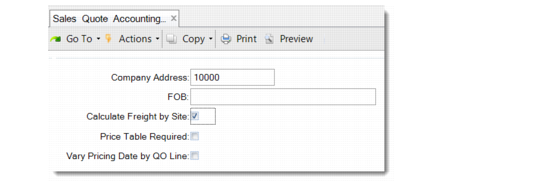
• In Sales Quote Accounting Control (36.9.9), specify operational settings that have an impact on financial activities, such as whether to calculate freight charges by site.
Sales Quote Control (7.12.24)
Quote Prefix and Next Quote
Set up a prefix for the quote number to easily distinguish quotes from sales orders. Start automatic number assignment with a high number to ensure that the alphanumeric sort properly sequences the quotes.
Ln Format S/M
You can enter quotes in either single- or multiple-line mode—depending on how many fields are updated during order entry. New quotes default to the value set in this field.
Are Quotes Printed
Set this field based on your company procedure. This field determines the default for the Print Quote field when a new quote is created.
Quote Header and Line Comments
Set default values based on whether your company normally uses comments.
Days Until Expire
Enter a default number of days for the system to add to the quote date to produce an expiration date. For example, if you set this field to 60, then generate a quote on April 3, the Expires field on the quote header defaults to June 2.
Sales Quote Accounting Control (36.9.9)
Company Address
Use Company Address Maintenance (2.12) to set up the company address you want printed on the top of the sales quote—generally, your formal address. Leave blank to use preprinted forms.
FOB
Optional default free-on-board location for calculating freight charges manually. A value set here appears in the quote trailer and is copied to the sales order.
Calculate Freight by Site
Companies with multiple ship-from sites usually set this field to Yes. The system then calculates freight charges using the line item site. Otherwise, it uses the header site.
Price Table Required
This field determines how strictly price lists are used to control order entry.
No: Items can be entered whether a price list exists.
Yes: Only items from an existing price list can be entered, and only if the price list item, unit of measure, and currency match the order item, unit of measure, and currency exactly.
Vary Pricing Date by QO Line
During line-item entry in Sales Quote Maintenance, a pop-up window displays four fields related to pricing: Pricing Date, Credit Terms Interest %, Reprice, and Manual. If Vary Pricing Date by QO Line is Yes, you can modify the Pricing Date and Credit Terms Interest % fields for each line. When Vary Pricing Date by QO Line is No, you cannot update these fields on individual lines. Instead, the system automatically updates all the lines when you change the header field.