ATP Settings for Items
Two programs let you specify ATP settings for individual items:
• Use Item Master Maintenance (1.4.1) to define ATP information for specified individual items and family items regardless of site.
• Use Item-Site Planning Maintenance (1.4.17) to determine ATP settings for specified individual items and family items by site. Item-site records take precedence over those defined in Item Master Maintenance.
These programs use the same two fields for defining ATP parameters:
ATP Enforce
Enter the ATP enforcement level you want the system to apply to this item. You can specify one of three different levels:
• None: The system does not intervene in the transaction regardless of availability of this item.
• Warning: A warning pop-up window displays if availability is insufficient. You can bypass the ATP warning manually and process the sales order regardless of ATP.
• Error: The system displays an error pop-up window if availability is insufficient. If you do not change the quantity or due date as needed to meet ATP requirements, an error message displays. Unlike with the Warning level, the system will not process the order line unless the quantity is available on the due date.
ATP Family
Enter Yes to have the system check the ATP for other items of the same family before issuing a warning or error. If No, family items are ignored.
Use the Family ATP Calculation field in Sales Order Control to indicate whether the system adjusts the family item ATP values.
ATP Horizon
Enter the number of days from the current date that you want the system to consider when determining if ATP quantities are sufficient to fill orders for this item.
The field defaults to 0 (zero) in Item Master Maintenance. Unless you update it, the system uses the horizon specified in Sales Order Control.
The Item Master Maintenance value defaults to new records in Item-Site Planning Maintenance. You can change it for individual sites. Set it to 0 to use the Sales Order Control ATP horizon.
Item Record Updates
Two utility programs let you update ATP settings in multiple item and item-site records:
• ATP Enforcement Level Utility
• Item-Site ATP Horizon Update
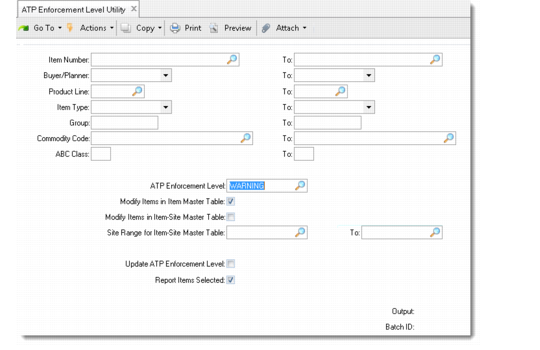
Use ATP Enforcement Level Utility (7.1.19.1) to set enforcement levels for ranges of items and sites. You can select according to various criteria to manage ATP enforcement levels, eliminating the need to process each item individually.
Note: If you are in a multi-domain or database environment, run ATP Enforcement Level Utility once in each domain or database to keep item-site ATP settings synchronized.
ATP Enforcement Level Utility (7.1.19.1)
Specify selection criteria ranges as needed; then use the following fields to determine how ATP records are updated:
Modify Items in Item Master Table
Enter Yes to modify the ATP enforcement level for a range of items in the item master table. Otherwise, enter No.
Changing the ATP enforcement level in the item master table only does not modify the level in the item-site master table.
Modify Items in Item-Site Master Table
Enter Yes to modify the ATP enforcement level for a range of items in the item-site master table. Otherwise, enter No.
When an item and site are entered in a sales order line, the system checks the ATP enforcement level in the item-site master table first. If no records exist there, the system uses data recorded in the item master table, if any.
Site Range for Item-Site Master Table
Enter the range of site codes for which you want to specify an the ATP enforcement level in the item-site master table. Leave blank to begin with the first site record.
Note: Specifying a range of sites when Modify Items in Item-Site Master Table is No has no effect.
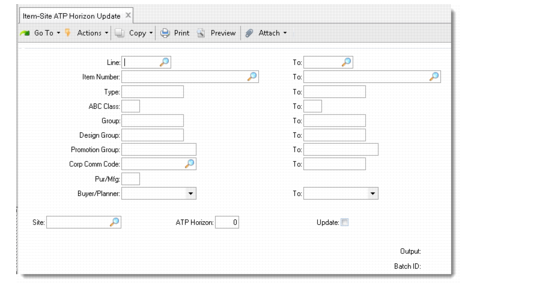
Use Item-Site ATP Horizon Update (1.4.24) to reset the ATP horizon for ranges of selected items.
Item-Site ATP Horizon Update (1.4.24)
Specify selection criteria ranges as needed; then use the following fields to determine how the ATP horizon is updated:
Site
Enter a valid site code to update only records created for that site in Item-Site Planning Maintenance. Leave the field blank to update only Item Master Maintenance records.
ATP Horizon
Specify the number of days to be used in ATP calculations for selected item or item-site records. Enter 0 to reset existing records to use the Sales Order Control value.