Setting Up Shipment Certification
Installing OpenSSL
As a prerequisite to installing OpenSSL, ensure that you install the Microsoft Visual C++ 2008 redistributable on the machine on which you want to install OpenSSL. You can download Microsoft Visual C++ 2008 from the Microsoft website.
To install OpenSSL:
1 Download file Win32_OpenSsL_v1.0.0<latest> from the following Web site:
where <latest> is the version letter for the latest version.
2 Run the install file and choose to install the DLL files in the local bin directory instead of the Windows directory.
3 Ensure that you:
• Reboot your machine after the installation.
or
• Restart the Progress admin service.
As a result, the newly created environment variables on system level become known throughout the system.
Configuring System Maintain
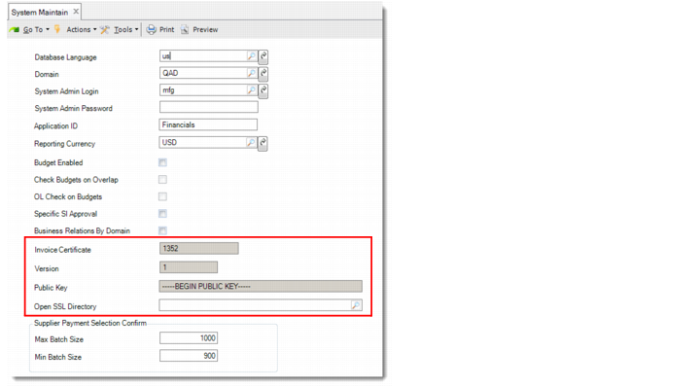
Configure shipment certification using four fields in System Maintain.
System Maintain
Invoice Certificate
This field displays QAD’s certification number for invoice and shipment, assigned by the local government. This field is updated using System Synchronize. QAD’s certification number for Portugal is 1352.
Version
This field displays the version number of the public and private keys. This field is updated using System Synchronize.
Public Key
This field displays the invoice/shipment certification public key created by QAD. This field is updated using System Synchronize.
Open SSL Directory
Specify the OpenSSL bin directory. OpenSSL is used to generate the private and public keys.
This field is mandatory. You cannot enable invoice/shipment certification if you have not specified the OpenSSL bin directory.
Enabling Shipment Certification
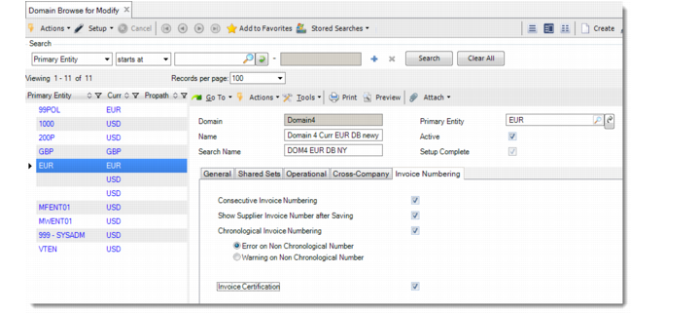
To enable Shipment Certification, go to the Invoice Numbering tab in Domain Modify and select Invoice Certification.
For details on how this option affects the other options on the Invoice Numbering tab, see
QAD Financials User Guide.Important: You cannot disable Shipment Certification if it has been enabled for a domain.
Domain Modify, Invoice Numbering Tab