Standard EMT Overview
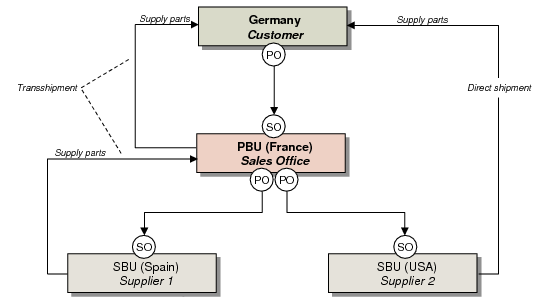
Standard EMT includes a simple, two-level relationship between two business units:
• A primary business unit (PBU) is responsible for processing the customer’s original purchase order.
• A secondary business unit (SBU) is responsible for maintaining secondary sales orders created from the PBU’s purchase order.
A PBU can have multiple SBUs, and SBUs can reside in different countries.
Standard EMT begins at the PBU when you enter a confirmed sales order line for an item that has been set up for EMT processing. Either enter the sales order manually in Sales Order Maintenance (7.1.1) or use EDI eCommerce to import your customer’s purchase order. When the sales order is confirmed, EMT automatically generates the appropriate purchase orders, called EMT POs. You then use EDI eCommerce to transmit EMT POs to the supplier.
Note: This chapter assumes that you are using a fully automated EMT environment, which is supported by EDI eCommerce.
If the supplying SBU site is in a domain in the current database, you can make a direct allocation. This is a preliminary allocation of inventory at the SBU site that is automatically converted to a normal allocation when the SBU imports the PBU’s purchase order.
The SBU’s system imports the EMT PO and converts it to a secondary sales order. After sending a PO acknowledgment to the PBU, the SBU then uses its standard procedures to fill the sales order by purchasing or manufacturing the items. Based on information provided by the original end customer and the PBU, the SBU can ship EMT sales orders in two ways:
• With direct shipments, the SBU is authorized to satisfy a demand directly, bypassing the site that originally received the customer’s purchase order. Direct shipment is not available for material orders.
• With transshipments, the SBU must satisfy a demand through the PBU, which in turn ships the order to the original customer. The PBU typically adds value such as packaging or testing.
Standard EMT Order Processing Model
The SBU transmits a status change indicating that the order has been picked, shipped, or—in the case of a configured item—released to a work order. Based on control program settings, the PBU may still be able to make changes to its primary sales order after a status change. If the SBU wants to make changes to the promise date or quantity required, it transmits a change request to the PBU, which either accepts or denies the request.
Note: The promise date at the SBU is the same as the due date at the PBU.
When the SBU confirms the shipping document to ship the order, the system automatically generates an advance ship notice (ASN) document for transmission to the PBU. When imported, this document creates a purchase order shipper, which can then be received at the PBU.
• For direct shipments, the PBU does not physically receive the merchandise, since the SBU ships it directly to the end customer. Instead, the system creates a receiving inventory transaction then immediately issues the merchandise to the sales order, as though it has been shipped from the PBU. Based on control program settings, the PBU can choose to automatically receive the PO when it imports the ASN without any operator action. The PBU can then create a sales order shipper, issue an ASN to the customer, and invoice the order.
• For transshipments, the SBU ships the merchandise to the PBU. The PBU receives it just as it would any PO. The system automatically allocates the merchandise to the primary sales order, and the PBU follows its standard procedures to ship to the end customer, generate an ASN, and submit an invoice.