Legal Document Life Cycle
The legal document is basically an inventory movement document and shares a similar processing flow with the shipper.
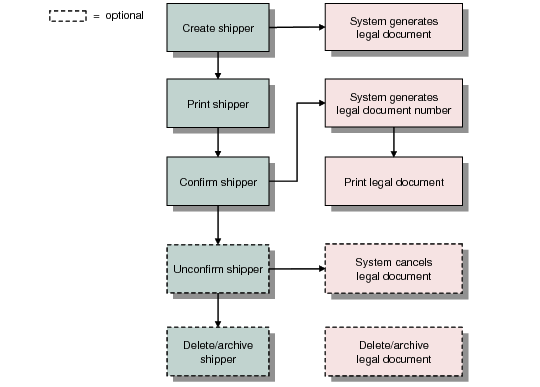
The following diagram illustrates the legal document life cycle in relation to the shipper.
Legal Document Life Cycle
1 When a shipper is created, the system automatically generates a legal document. However, no legal document number is assigned at this time.
2 After you print and confirm the shipper, the system generates a legal document number using your specified NRM sequence and assigns it to the legal document.
3 Depending on your legal document control settings, you can either print the legal document immediately after shipper confirm or print it later using Legal Document Print (7.10.4).
4 Depending on the Legal Document Cancel Time Fence setting in Legal Document Control (7.10.24), the system may automatically cancel the legal document when the shipper is unconfirmed.
5 Just as with shippers, you can delete legal documents from the database and archive them when the online records are no longer needed.